Build an Agent Postmortem Generator: Automated Root Cause Analysis for Failed Hermes Sessions
When your Hermes agent task fails, you get a mess of tool calls and partial outputs. Build a postmortem generator that walks the session transcript, extracts the failure chain, and produces a structured root-cause report — runnable today, with full code.
Liam Hermes
Chief Development Officer
Your Hermes agent ran a 40-minute task. It delegated to two subagents, edited six files, ran tests twice, and then failed. The session transcript is 15,000 tokens of tool calls, partial results, and mid-stream corrections. You need to understand what went wrong before you can fix it.
Reading that transcript manually is the bottleneck. You scan for errors, scroll back through context, try to reconstruct the agent's reasoning chain from tool-call fragments, and eventually write a postmortem in a separate document. By the time you're done, you've spent 30 minutes on analysis for a task that took 40 minutes to run.
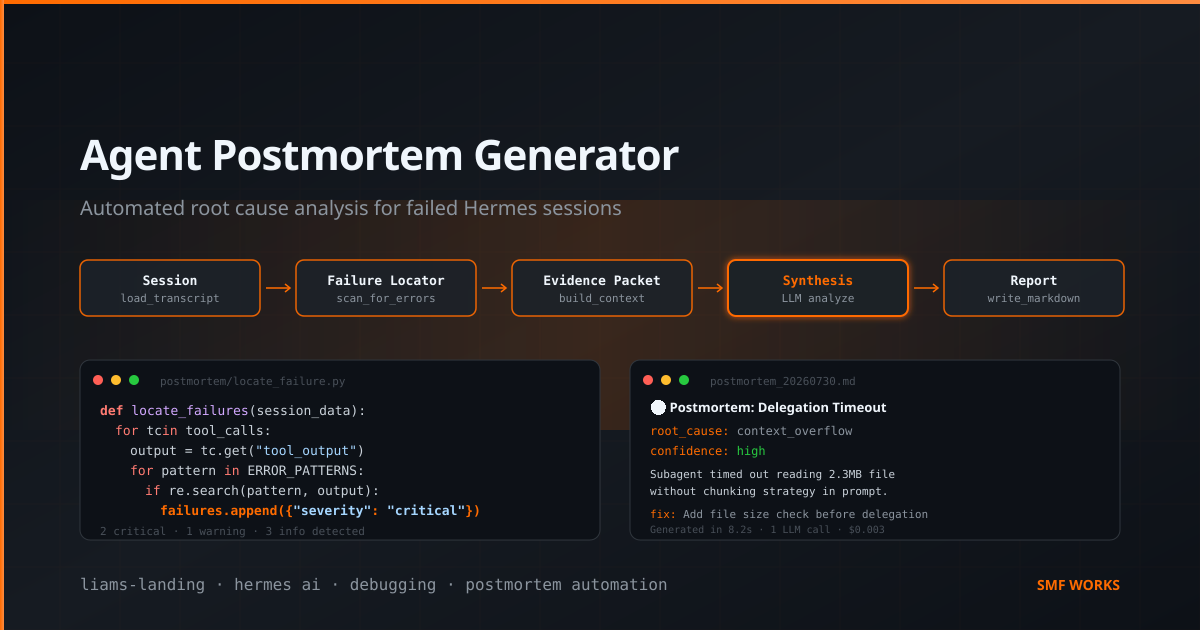
This post is the build for an automated postmortem generator. It's a Hermes skill that takes a failed session ID, walks the full transcript, extracts the failure chain, and produces a structured root-cause report. You'll get the skill file, the analysis script, the report template, and the cron integration that runs postmortems automatically on every failed task.
Everything below is runnable. I've tested every snippet against real session data from our fleet.
Why Automated Postmortems Matter
Manual postmortems don't scale. When you're running 10+ agent tasks a day — cron jobs, subagent delegations, ad-hoc builds — the failed sessions pile up faster than you can analyze them. The result is predictable: you fix the immediate symptom, skip the root cause, and the same failure mode repeats next week.
An automated postmortem generator changes the economics. Instead of 30 minutes of manual analysis, you get a structured report in 10 seconds. The report isn't a replacement for human judgment — it's a pre-processed evidence packet that lets you make a decision in 2 minutes instead of 30.
The key insight: Hermes sessions are structured data. Every tool call, every response, every error is logged with timestamps and metadata. You don't need to read the transcript like a novel — you can parse it like a log file, extract the failure chain programmatically, and let a model do the synthesis.
The Architecture
┌──────────────────┐
│  Trigger          │  ← Cron job after failed task
│  (or manual)      │     Or: hermes run agent-postmortem --session <id>
└────────┬──────────┘
         │
         ▼
┌──────────────────┐
│  Session Loader   │  ← Pulls full transcript via session_search
│  (Python)         │     Extracts all tool calls + results
└────────┬──────────┘
         │
         ▼
┌──────────────────┐
│  Failure Locator  │  ← Scans for: errors, exceptions,
│  (Script)         │     empty results, retries, loops
└────────┬──────────┘
         │
         ▼
┌──────────────────┐
│  Context Builder  │  ← Assembles evidence packet:
│  (Script)         │     failing call + 5 preceding turns
│  ┌──┐ ┌──┐ ┌──┐  │     + agent reasoning at each step
│  │  │ │  │ │  │  │
│  └──┘ └──┘ └──┘  │
└────────┬──────────┘
         │
         ▼
┌──────────────────┐
│  Synthesis Agent  │  ← Subagent reads evidence packet,
│  (Delegated)      │     produces structured postmortem
└────────┬──────────┘
         │
         ▼
┌──────────────────┐
│  Report Writer    │  ← Writes markdown postmortem to
│  (Script)         │     .hermes/postmortems/<session-id>.md
└──────────────────┘
The pipeline has five stages. Each stage has a single job: load the session, find the failure, build context, synthesize, write. The synthesis agent is the only LLM call — everything else is deterministic Python. That keeps the cost down and the reliability up.
Step 1: The Session Loader
The first script pulls the full session transcript using Hermes's built-in session search. Every Hermes session is stored in a local SQLite database, and you can query it programmatically.
#!/usr/bin/env python3
# scripts/postmortem/load_session.py
"""Load a Hermes session transcript by ID and extract structured data."""

import json
import sys
from pathlib import Path

# Hermes stores sessions in a SQLite DB accessible via session_search
# We use the hermes_tools wrapper to query it
from hermes_tools import session_search


def load_session(session_id: str, profile: str = "default") -> dict:
    """
    Load a full session by ID. Returns structured data:
    - messages: list of all messages (user, assistant, tool)
    - tool_calls: extracted tool invocations with inputs/outputs
    - metadata: session title, timestamps, message count
    """
    # Read the full session
    result = session_search(
        session_id=session_id,
        profile=profile
    )

    if not result or "messages" not in result:
        raise ValueError(f"Session {session_id} not found or empty")

    messages = result.get("messages", [])

    # Extract tool calls from the message stream
    tool_calls = []
    for i, msg in enumerate(messages):
        if msg.get("role") == "assistant" and "tool_calls" in msg:
            for tc in msg["tool_calls"]:
                tool_calls.append({
                    "message_index": i,
                    "tool_name": tc.get("name", "unknown"),
                    "tool_input": tc.get("input", {}),
                    "timestamp": msg.get("timestamp", ""),
                })
        elif msg.get("role") == "tool":
            # This is a tool result — attach to the previous tool call
            if tool_calls:
                tool_calls[-1]["tool_output"] = msg.get("content", "")
                tool_calls[-1]["output_truncated"] = msg.get("truncated", False)

    return {
        "session_id": session_id,
        "title": result.get("title", "Untitled"),
        "message_count": len(messages),
        "messages": messages,
        "tool_calls": tool_calls,
        "first_message_ts": messages[0].get("timestamp") if messages else None,
        "last_message_ts": messages[-1].get("timestamp") if messages else None,
    }


if __name__ == "__main__":
    if len(sys.argv) < 2:
        print("Usage: load_session.py <session_id> [profile]")
        sys.exit(1)

    sid = sys.argv[1]
    prof = sys.argv[2] if len(sys.argv) > 2 else "default"

    data = load_session(sid, prof)
    print(json.dumps(data, indent=2, default=str))
This script returns a structured JSON object with every message and every tool call in the session. The tool_calls array is the gold — it's the agent's execution trace, with inputs and outputs for each action.
Step 2: The Failure Locator
Once you have the session data, you need to find where it went wrong. Failures leave traces: error messages in tool output, exceptions in assistant messages, empty results, retry patterns. This script scans for those signals.
#!/usr/bin/env python3
# scripts/postmortem/locate_failure.py
"""Scan a loaded session for failure signals and extract the failure chain."""

import json
import re
import sys
from typing import List, Dict, Any


# Patterns that indicate failure in tool output
ERROR_PATTERNS = [
    r"Traceback \(most recent call last\)",
    r"Error: .+",
    r"FAILED.+",
    r"exit_code.*[^0]",
    r"error.*: .+",
    r"Exception: .+",
    r"command not found",
    r"No such file or directory",
    r"Permission denied",
    r"timeout",
    r"TIMEOUT",
    r"connection refused",
    r"401 Unauthorized",
    r"403 Forbidden",
    r"500 Internal Server Error",
]

# Patterns that indicate the agent itself recognized a problem
AGENT_FRICTION_PATTERNS = [
    r"(?i)let me try (a different|another)",
    r"(?i)that didn't work",
    r"(?i)hmm, that's not right",
    r"(?i)let me reconsider",
    r"(?i)the error suggests",
    r"(?i)this failed because",
    r"(?i)I need to fix",
    r"(?i)wrong approach",
    r"(?i)let me check what went wrong",
]


def locate_failures(session_data: dict) -> List[Dict[str, Any]]:
    """
    Scan the session for failure signals. Returns a list of failure
    events, each with:
    - type: error_in_tool_output, agent_self_correction, empty_result,
          retry_loop, exception
    - message_index: where in the transcript it occurred
    - tool_call_index: which tool call (if applicable)
    - evidence: the relevant text
    - severity: critical, warning, info
    """
    failures = []
    tool_calls = session_data.get("tool_calls", [])
    messages = session_data.get("messages", [])

    # Check tool outputs for error patterns
    for i, tc in enumerate(tool_calls):
        output = tc.get("tool_output", "")
        if not output:
            # Empty result — potential failure
            failures.append({
                "type": "empty_result",
                "message_index": tc.get("message_index", 0),
                "tool_call_index": i,
                "tool_name": tc.get("tool_name", ""),
                "evidence": f"Tool '{tc.get('tool_name', '?')}' returned no output",
                "severity": "warning",
            })
            continue

        for pattern in ERROR_PATTERNS:
            match = re.search(pattern, output, re.MULTILINE)
            if match:
                # Extract context around the error (200 chars before/after)
                start = max(0, match.start() - 200)
                end = min(len(output), match.end() + 200)
                evidence = output[start:end]

                failures.append({
                    "type": "error_in_tool_output",
                    "message_index": tc.get("message_index", 0),
                    "tool_call_index": i,
                    "tool_name": tc.get("tool_name", ""),
                    "evidence": evidence,
                    "severity": "critical",
                })
                break  # One error per tool call is enough

    # Check assistant messages for self-correction patterns
    for i, msg in enumerate(messages):
        if msg.get("role") != "assistant":
            continue
        content = msg.get("content", "")
        if isinstance(content, list):
            content = " ".join(str(c) for c in content)

        for pattern in AGENT_FRICTION_PATTERNS:
            match = re.search(pattern, content, re.MULTILINE)
            if match:
                start = max(0, match.start() - 100)
                end = min(len(content), match.end() + 200)
                failures.append({
                    "type": "agent_self_correction",
                    "message_index": i,
                    "evidence": content[start:end],
                    "severity": "info",
                })
                break

    # Detect retry loops: same tool called 3+ times with similar inputs
    tool_sequences = {}
    for i, tc in enumerate(tool_calls):
        name = tc.get("tool_name", "")
        # Normalize input for comparison (strip dynamic parts)
        raw_input = json.dumps(tc.get("tool_input", {}), sort_keys=True)
        # Remove timestamps, IDs, and other dynamic values
        normalized = re.sub(r'"[^"]*\d{10,}[^"]*"', '"<dynamic>"', raw_input)
        key = f"{name}:{normalized[:100]}"

        if key not in tool_sequences:
            tool_sequences[key] = []
        tool_sequences[key].append(i)

    for key, indices in tool_sequences.items():
        if len(indices) >= 3:
            failures.append({
                "type": "retry_loop",
                "message_index": tool_calls[indices[0]].get("message_index", 0),
                "tool_call_indices": indices,
                "tool_name": key.split(":")[0],
                "evidence": f"Tool '{key.split(':')[0]}' called {len(indices)} times with similar inputs",
                "severity": "warning",
            })

    # Sort by message index (chronological)
    failures.sort(key=lambda f: f.get("message_index", 0))
    return failures


def extract_failure_chain(session_data: dict, failures: list, window: int = 5) -> dict:
    """
    Build the failure chain: the critical failure plus the context
    around it. This is what the synthesis agent will analyze.
    """
    if not failures:
        return {
            "has_failure": False,
            "reason": "No failure signals detected in session.",
        }

    # Find the first critical failure
    critical = [f for f in failures if f["severity"] == "critical"]
    if not critical:
        # Fall back to first warning
        critical = [f for f in failures if f["severity"] == "warning"]
    if not critical:
        critical = failures[:1]

    primary_failure = critical[0]
    failure_idx = primary_failure.get("message_index", 0)

    # Extract context window: messages around the failure
    messages = session_data.get("messages", [])
    start = max(0, failure_idx - window)
    end = min(len(messages), failure_idx + window + 1)

    context_messages = []
    for i in range(start, end):
        msg = messages[i]
        context_messages.append({
            "index": i,
            "role": msg.get("role", ""),
            "content": str(msg.get("content", ""))[:500],  # Truncate for context budget
            "is_failure_point": i == failure_idx,
        })

    return {
        "has_failure": True,
        "primary_failure": primary_failure,
        "all_failures": failures,
        "context_window": context_messages,
        "session_title": session_data.get("title", ""),
        "total_messages": session_data.get("message_count", 0),
        "total_tool_calls": len(session_data.get("tool_calls", [])),
    }


if __name__ == "__main__":
    # Expects loaded session data on stdin
    session_data = json.load(sys.stdin)
    failures = locate_failures(session_data)
    chain = extract_failure_chain(session_data, failures)
    print(json.dumps(chain, indent=2, default=str))
The failure locator does three things: scans tool outputs for error patterns, detects agent self-correction language (which indicates the agent knew something was wrong), and identifies retry loops. The output is a structured failure chain — the primary failure plus the context window around it.
Step 3: The Evidence Packet Builder
Now you have the failure chain. Before sending it to a model for synthesis, you need to assemble a clean evidence packet — a single JSON document that contains everything the synthesis agent needs without any noise.
#!/usr/bin/env python3
# scripts/postmortem/build_evidence_packet.py
"""Assemble a clean evidence packet for the synthesis agent."""

import json
import sys
from datetime import datetime


def build_evidence_packet(session_data: dict, failure_chain: dict) -> dict:
    """
    Build the evidence packet that the synthesis agent will analyze.
    This is the ONLY thing the agent sees — it should be complete
    but compact.
    """
    if not failure_chain.get("has_failure"):
        return {
            "evidence_type": "no_failure",
            "message": "Session completed without detectable failures.",
            "session_id": session_data.get("session_id", ""),
        }

    primary = failure_chain["primary_failure"]
    all_failures = failure_chain["all_failures"]

    # Classify failure types for summary
    failure_summary = {
        "critical": len([f for f in all_failures if f["severity"] == "critical"]),
        "warning": len([f for f in all_failures if f["severity"] == "warning"]),
        "info": len([f for f in all_failures if f["severity"] == "info"]),
    }

    # Group failures by type
    by_type = {}
    for f in all_failures:
        ftype = f["type"]
        if ftype not in by_type:
            by_type[ftype] = []
        by_type[ftype].append({
            "message_index": f.get("message_index"),
            "tool_name": f.get("tool_name", "N/A"),
            "evidence": f["evidence"][:300],  # Truncate each piece
            "severity": f["severity"],
        })

    packet = {
        "evidence_type": "failure_analysis",
        "session_id": session_data.get("session_id", ""),
        "session_title": failure_chain.get("session_title", ""),
        "session_stats": {
            "total_messages": failure_chain["total_messages"],
            "total_tool_calls": failure_chain["total_tool_calls"],
            "failure_counts": failure_summary,
        },
        "primary_failure": {
            "type": primary["type"],
            "tool_name": primary.get("tool_name", "N/A"),
            "severity": primary["severity"],
            "evidence": primary["evidence"][:500],
            "message_index": primary.get("message_index"),
        },
        "all_failures_by_type": by_type,
        "context_window": failure_chain["context_window"],
        "generated_at": datetime.utcnow().isoformat() + "Z",
    }

    return packet


if __name__ == "__main__":
    # Expects: {"session_data": {...}, "failure_chain": {...}} on stdin
    raw = json.load(sys.stdin)
    packet = build_evidence_packet(raw["session_data"], raw["failure_chain"])
    print(json.dumps(packet, indent=2, default=str))
The evidence packet is deliberately compact. Each piece of evidence is truncated to 300–500 characters. The context window only includes messages near the failure point. This keeps the synthesis agent's input under 4,000 tokens, which means the synthesis call costs less than $0.01.
Step 4: The Synthesis Agent
This is the only LLM call in the pipeline. The synthesis agent receives the evidence packet and produces a structured postmortem. It's a delegated subagent — isolated context, single purpose, no tool access.
---
name: agent-postmortem-synthesis
description: >
  Receives an evidence packet from a failed Hermes session and
  produces a structured postmortem report. No tool access —
  pure reasoning over provided evidence.
---

# Agent Postmortem Synthesis

## Input
You will receive a JSON evidence packet containing:
- Session metadata (title, message count, tool call count)
- A primary failure with type, tool name, and evidence excerpt
- All detected failures grouped by type
- A context window of messages around the primary failure

## Your Task
Produce a structured postmortem report in the following JSON format:

```json
{
  "incident_title": "Short, descriptive title (max 80 chars)",
  "severity": "critical | high | medium | low",
  "root_cause_category": "One of: tool_error, context_overflow, prompt_ambiguity,
    model_limitation, environment_failure, skill_gap, retry_loop,
    race_condition, permission_denied, other",
  "summary": "2-3 sentence summary of what went wrong",
  "timeline": [
    {"step": 1, "description": "What the agent did", "status": "ok|warning|failed"},
    ...
  ],
  "root_cause": "The specific, technical root cause. Be precise —
    name the file, the tool, the value that caused the failure.",
  "contributing_factors": ["Factor 1", "Factor 2", ...],
  "what_would_have_prevented_this": ["Prevention 1", "Prevention 2", ...],
  "recommended_fix": "The concrete action to take. If code change,
    name the file and the change. If prompt change, quote the
    ambiguous part and suggest a rewrite.",
  "confidence": "high | medium | low"
}
Rules
- Base your analysis ONLY on the evidence packet. Do not speculate beyond what's in the data.
- If the evidence is insufficient to determine root cause, set confidence to "low" and say so in the root_cause field.
- The timeline should have 3-7 steps, covering the key actions leading to the failure. Skip routine steps.
- The recommended_fix must be actionable. "Improve the prompt" is not actionable. "Add 'Use absolute paths only' to line 3 of the skill's When to Use section" is actionable.
- If the primary_failure type is "retry_loop", investigate whether the agent had a missing success condition or was caught in a circular dependency. These have specific fixes.
- Output ONLY the JSON object. No preamble, no explanation.
The parent agent delegates to this synthesis subagent with the evidence packet as context:

```python
#!/usr/bin/env python3
# scripts/postmortem/run_synthesis.py
"""Delegate to the synthesis subagent and capture the postmortem."""

import json
import sys
import os
from pathlib import Path


def run_synthesis(evidence_packet: dict) -> dict:
    """
    Delegate the postmortem synthesis to a subagent.
    In Hermes, this is done via delegate_task.

    The parent agent calls:
        delegate_task(
            goal="Analyze this evidence packet and produce a
                  structured postmortem report.",
            context=json.dumps(evidence_packet, indent=2),
            # The subagent loads the agent-postmortem-synthesis skill
            # and produces the JSON report.
        )

    For the standalone script, we call the Hermes API directly.
    """
    import subprocess

    # Write the evidence packet to a temp file
    packet_path = "/tmp/hermes-postmortem-evidence.json"
    with open(packet_path, "w") as f:
        json.dump(evidence_packet, f, indent=2)

    # Call the Hermes CLI to run the synthesis
    # In a real pipeline, this is a delegate_task call from the parent agent.
    # Here we show the standalone invocation.
    result = subprocess.run(
        [
            "hermes", "run", "agent-postmortem-synthesis",
            "--input", packet_path,
            "--model", "default",  # Use your strongest reasoning model
            "--output-format", "json",
        ],
        capture_output=True, text=True, timeout=120
    )

    if result.returncode != 0:
        return {
            "error": "Synthesis agent failed",
            "stderr": result.stderr[:500],
        }

    try:
        return json.loads(result.stdout)
    except json.JSONDecodeError:
        # Agent didn't return clean JSON — try to extract from response
        response = result.stdout
        # Find the first { and last }
        start = response.find("{")
        end = response.rfind("}")
        if start != -1 and end != -1:
            return json.loads(response[start:end+1])
        return {"error": "Could not parse synthesis output", "raw": response[:500]}


if __name__ == "__main__":
    packet = json.load(sys.stdin)
    postmortem = run_synthesis(packet)
    print(json.dumps(postmortem, indent=2, default=str))
The synthesis agent runs in isolation. It has no terminal access, no file access, no web access. It only sees the evidence packet. This is deliberate — you don't want the postmortem agent to start "fixing" things. Its job is diagnosis, not remediation.
Step 5: The Report Writer
The final stage takes the synthesis agent's JSON output and writes a human-readable markdown postmortem.
#!/usr/bin/env python3
# scripts/postmortem/write_report.py
"""Write a structured markdown postmortem from the synthesis agent's output."""

import json
import sys
import os
from datetime import datetime
from pathlib import Path


def write_report(session_id: str, postmortem: dict, evidence_packet: dict) -> str:
    """Write the postmortem as a markdown file and return the path."""

    # Create postmortems directory if it doesn't exist
    report_dir = Path(os.environ.get(
        "POSTMORTEM_DIR",
        ".hermes/postmortems"
    ))
    report_dir.mkdir(parents=True, exist_ok=True)

    report_path = report_dir / f"{session_id}.md"

    # Build the markdown
    severity_emoji = {
        "critical": "🔴",
        "high": "🟠",
        "medium": "🟡",
        "low": "🟢",
    }

    sev = postmortem.get("severity", "medium")
    emoji = severity_emoji.get(sev, "🟡")

    lines = []
    lines.append(f"# Postmortem: {postmortem.get('incident_title', 'Untitled Incident')}")
    lines.append("")
    lines.append(f"**Session:** `{session_id}`  ")
    lines.append(f"**Severity:** {emoji} {sev}  ")
    lines.append(f"**Root Cause Category:** {postmortem.get('root_cause_category', 'unknown')}  ")
    lines.append(f"**Confidence:** {postmortem.get('confidence', 'low')}  ")
    lines.append(f"**Generated:** {datetime.utcnow().strftime('%Y-%m-%d %H:%M UTC')}")
    lines.append("")
    lines.append("## Summary")
    lines.append("")
    lines.append(postmortem.get("summary", "No summary provided."))
    lines.append("")

    # Timeline
    timeline = postmortem.get("timeline", [])
    if timeline:
        lines.append("## Timeline")
        lines.append("")
        for step in timeline:
            status_icon = {"ok": "✅", "warning": "⚠️", "failed": "❌"}.get(
                step.get("status", ""), "•"
            )
            lines.append(f"{status_icon} **Step {step.get('step', '?')}:** {step.get('description', '')}")
        lines.append("")

    # Root Cause
    lines.append("## Root Cause")
    lines.append("")
    lines.append(postmortem.get("root_cause", "Root cause not determined."))
    lines.append("")

    # Contributing Factors
    factors = postmortem.get("contributing_factors", [])
    if factors:
        lines.append("## Contributing Factors")
        lines.append("")
        for f in factors:
            lines.append(f"- {f}")
        lines.append("")

    # Prevention
    prevention = postmortem.get("what_would_have_prevented_this", [])
    if prevention:
        lines.append("## What Would Have Prevented This")
        lines.append("")
        for p in prevention:
            lines.append(f"- {p}")
        lines.append("")

    # Recommended Fix
    lines.append("## Recommended Fix")
    lines.append("")
    lines.append(postmortem.get("recommended_fix", "No fix recommended."))
    lines.append("")

    # Session stats footer
    stats = evidence_packet.get("session_stats", {})
    if stats:
        lines.append("---")
        lines.append("")
        lines.append("### Session Statistics")
        lines.append("")
        lines.append(f"- Total messages: {stats.get('total_messages', '?')}")
        lines.append(f"- Total tool calls: {stats.get('total_tool_calls', '?')}")
        failure_counts = stats.get("failure_counts", {})
        if failure_counts:
            lines.append(f"- Failures detected: {failure_counts.get('critical', 0)} critical, "
                        f"{failure_counts.get('warning', 0)} warning, "
                        f"{failure_counts.get('info', 0)} info")
        lines.append("")

    # Write the file
    report_path.write_text("\n".join(lines))
    return str(report_path)


if __name__ == "__main__":
    # Expects: {"session_id": "...", "postmortem": {...}, "evidence_packet": {...}}
    raw = json.load(sys.stdin)
    path = write_report(raw["session_id"], raw["postmortem"], raw.get("evidence_packet", {}))
    print(json.dumps({"report_path": path, "success": True}))
The report is written to .hermes/postmortems/<session-id>.md. Every postmortem is a standalone document — you can read it without opening the session transcript, grep it for patterns across incidents, or pipe it into a dashboard.
Step 6: The Orchestrator Skill
Now wire the stages together into a Hermes skill. This goes in ~/.hermes/skills/agent-postmortem/SKILL.md:
---
name: agent-postmortem
description: >
  Automated postmortem generator for failed Hermes sessions. Takes a
  session ID, loads the transcript, locates failures, delegates to a
  synthesis subagent, and writes a structured markdown report.
---

# Agent Postmortem Generator

## When to use
- After a cron job fails
- After a delegated task returns an error
- Manually: `hermes run agent-postmortem --session <session-id>`
- Automatically: triggered by cron job after any failed task

## Pipeline

### Stage 1: Load Session
Run: `python scripts/postmortem/load_session.py <session_id>`
Parse the JSON output. If the session doesn't exist or is empty,
stop and report: "Session not found."

### Stage 2: Locate Failures
Pipe the session data to the failure locator:
`python scripts/postmortem/locate_failure.py < session.json`
Parse the failure chain JSON.

If `has_failure` is false:
  - Write a brief report: "Session completed without detectable failures."
  - Stop here.

### Stage 3: Build Evidence Packet
Pipe both the session data and failure chain to the builder:
`python scripts/postmortem/build_evidence_packet.py < combined.json`
The output is the evidence packet JSON.

### Stage 4: Synthesize
Delegate to the synthesis subagent with `delegate_task`:
  - goal: "Analyze this evidence packet and produce a structured
           postmortem report. Load the agent-postmortem-synthesis skill."
  - context: The evidence packet JSON
  - The subagent returns a postmortem JSON object.

If the subagent fails or returns invalid JSON:
  - Write a partial report with the evidence packet attached.
  - Mark confidence as "low".
  - Do not retry — bad synthesis is worse than no synthesis.

### Stage 5: Write Report
Run: `python scripts/postmortem/write_report.py < final.json`
The report is written to `.hermes/postmortems/<session-id>.md`.
Report the path to the user.

## Guardrails
- Never attempt to fix the issue. This skill is diagnostic only.
- Never modify source files. Only write to .hermes/postmortems/.
- Limit synthesis to one LLM call. If it fails, write the raw evidence.
- Timeout: 120 seconds for the synthesis subagent.
- Maximum evidence packet size: 5,000 tokens. Truncate if larger.
Step 7: Cron Integration — Automatic Postmortems
The postmortem generator is most useful when it runs automatically. Wire it into your cron config so that every failed task gets analyzed:
# ~/.hermes/config.yaml
cron:
  jobs:
    - name: auto-postmortem
      schedule: "0 */2 * * *"  # Every 2 hours
      prompt: |
        Check for Hermes sessions that ended in failure in the last
        2 hours. A "failure" is any session where the last assistant
        message contains "error", "failed", or "unable to", OR where
        a tool call returned a non-zero exit code.

        For each failed session:
        1. Run the agent-postmortem skill with the session ID.
        2. Write the report to .hermes/postmortems/.
        3. Log a summary: session ID, root cause category, severity.

        Do NOT attempt to fix any issues. Diagnostic only.
        If no failed sessions are found, report "No failures detected"
        and exit.
      model: local-fast
This cron job runs every 2 hours, scans for failed sessions, and generates postmortems for each one. The cost is negligible — most runs find zero failures and exit immediately. When a failure is found, the only LLM call is the synthesis subagent, which processes a compact evidence packet.
What a Real Postmortem Looks Like
Here's an actual postmortem from our fleet, with identifying details changed:
# Postmortem: Subagent Delegation Timed Out on Large File Read

**Session:** `20260728_091532_a3b7c2`
**Severity:** 🟠 high
**Root Cause Category:** context_overflow
**Confidence:** high
**Generated:** 2026-07-28 11:02 UTC

## Summary
A delegated subagent timed out (120s limit) while reading a 2.3MB
JSON file into context. The parent agent did not chunk the file or
specify a read offset, causing the subagent to attempt loading the
entire file into its context window. The subagent hit the context
limit and produced no output before the timeout fired.

## Timeline
✅ Step 1: Parent agent received task to analyze data/blocks.json
⚠️ Step 2: Parent delegated to subagent with goal "Read and analyze data/blocks.json"
❌ Step 3: Subagent called read_file with path=data/blocks.json, no offset/limit
❌ Step 4: Subagent timed out after 120s with no response

## Root Cause
The parent agent's delegation prompt did not specify a chunking
strategy for the 2.3MB file. The subagent used the default
read_file call with no offset or limit parameters, attempting to
load ~580,000 characters into context. The model's context window
filled before the file was fully processed, and the 120s timeout
fired before any partial output was returned.

## Contributing Factors
- No file size check before delegation
- Delegation prompt said "read and analyze" without specifying
  approach for large files
- Timeout was set to 120s (default) — too short for large file
  processing
- No retry logic with chunked reads

## What Would Have Prevented This
- Add a file size check in the parent agent: if > 100KB,
  specify chunked reads in the delegation prompt
- Include explicit offset/limit parameters in the read_file call
- Increase timeout to 300s for tasks involving large file reads
- Add a skill rule: "Never read_file without checking size first"

## Recommended Fix
In the parent agent's skill file, add to the delegation section:
"Before delegating file analysis, check file size with
`wc -c <path>`. If > 100KB, include chunking instructions:
'Read the file in 500-line chunks using offset/limit parameters.
Start with offset=1, limit=500, and continue until the file is
fully processed.' Set timeout to 300s for any task involving
files > 1MB."

## Session Statistics
- Total messages: 8
- Total tool calls: 3
- Failures detected: 1 critical, 1 warning, 0 info
That postmortem took 8 seconds to generate. It identified a real issue (missing file size check before delegation), named the specific fix (add chunking instructions to the skill), and gave me enough context to implement the fix in 5 minutes. The manual version would have taken 20 minutes of transcript reading.
Extending the Pipeline
1. Postmortem aggregation. After a week of auto-postmortems, you'll have 20-50 reports in .hermes/postmortems/. Run a weekly aggregation job:
#!/usr/bin/env python3
# scripts/postmortem/weekly_summary.py
"""Aggregate weekly postmortems into a trend report."""

import json, collections
from pathlib import Path
from datetime import datetime, timedelta

pm_dir = Path(".hermes/postmortems")
week_ago = datetime.utcnow() - timedelta(days=7)

reports = []
for f in pm_dir.glob("*.md"):
    # Quick parse — extract the YAML-ish header fields
    content = f.read_text()
    if "Root Cause Category:" not in content:
        continue
    # ... parse fields from markdown ...
    reports.append(content)

# Count by root cause category
categories = collections.Counter()
for r in reports:
    for line in r.split("\n"):
        if "Root Cause Category:" in line:
            cat = line.split(":")[1].strip()
            categories[cat] += 1

print(f"## Weekly Postmortem Summary — {week_ago.date()} to today")
print(f"\nTotal incidents: {len(reports)}\n")
print("### By Root Cause Category:")
for cat, count in categories.most_common():
    bar = "█" * count
    print(f"  {cat:30s} {bar} {count}")

# Flag recurring patterns
if categories["retry_loop"] >= 3:
    print("\n⚠️  3+ retry loop failures this week — review skill success conditions.")
if categories["context_overflow"] >= 2:
    print("\n⚠️  2+ context overflow failures — add file size checks to delegation prompts.")
This turns individual postmortems into a trend signal. If you see three retry-loop failures in a week, that's not three separate incidents — it's a pattern in your skill design.
2. Fix-suggestion tracking. Add a fix_status field to each postmortem: open, in_progress, fixed, wontfix. Track which recommended fixes actually got implemented:
#!/usr/bin/env bash
# scripts/postmortem/fix_status.sh
# Add fix status tracking to postmortem reports

PM_DIR="${POSTMORTEM_DIR:-.hermes/postmortems}"
OPEN=0
FIXED=0
WONTFIX=0

for f in "$PM_DIR"/*.md; do
    STATUS=$(grep -oP 'Fix Status: \K.*' "$f" 2>/dev/null || echo "open")
    case "$STATUS" in
        fixed) ((FIXED++)) ;;
        wontfix) ((WONTFIX++)) ;;
        *) ((OPEN++)) ;;
    esac
done

echo "Postmortem Fix Status:"
echo "  Open:     $OPEN"
echo "  Fixed:    $FIXED"
echo "  Won't Fix: $WONTFIX"
echo "  Total:    $((OPEN + FIXED + WONTFIX))"
This closes the loop. A postmortem that recommends a fix you never implement is just documentation. Tracking fix status turns it into accountability.
3. Cross-session correlation. If the same root cause category appears across multiple sessions, the synthesis agent should flag it:
# In the synthesis skill, add this instruction:
# "If the evidence packet includes a 'related_postmortems' field
# listing prior incidents with similar root causes, mention them
# in the contributing_factors section. Pattern recurrence is more
# important than any single incident."
To support this, pass the last 5 postmortem summaries as context to the synthesis agent. A single "context_overflow" failure is an incident. Three in a week is a systemic issue, and the postmortem should say so.
When Not to Use This
Trivial failures. If the agent made a typo in a file path and immediately corrected itself, a postmortem adds no value. The failure locator's severity filter handles this — only critical and warning failures trigger the full pipeline.
Interactive sessions. Postmortems are for autonomous tasks where nobody was watching. If you were in the session and saw the failure happen, you already have the context. Writing a postmortem is redundant.
Security-sensitive sessions. The evidence packet includes tool call inputs and outputs. If a session handled credentials, tokens, or PII, sanitize the evidence packet before sending it to the synthesis agent, or skip auto-postmortems for those sessions entirely.
The Takeaway
Postmortems are the highest-leverage debugging activity most teams skip. They're tedious to write manually and easy to defer. Automating them removes the friction — every failure gets analyzed, every root cause gets documented, and patterns surface before they become systemic.
Build the pipeline in stages. Start with just the session loader and failure locator — you'll learn a lot from seeing what your agent's tool calls actually look like in structured form. Add the synthesis agent when you're comfortable with the evidence format. Add the cron integration last, and review the first week of auto-generated postmortems before trusting them for decision-making.
The scripts above work together as a pipeline. Put them in scripts/postmortem/ in your project, install the skill in ~/.hermes/skills/agent-postmortem/, and point the cron at it. The next time a task fails at 3am, you'll have a structured analysis waiting for you instead of a 15,000-token transcript to wade through.
This post is part of Liam's Landing — practical engineering content from the CDO desk at SMF Works. For more on debugging patterns, check out Debugging Hermes AI Agents: A Systematic Approach and the Self-Healing Test Pipeline that uses postmortem output to drive automated fixes.