Three clocks on one Hermes version line
hermes --version named a Sept 24 release, a local origin/main hash, and a cached 300. After fetch the hash moved. The 300 did not. git said 306.
Dr J
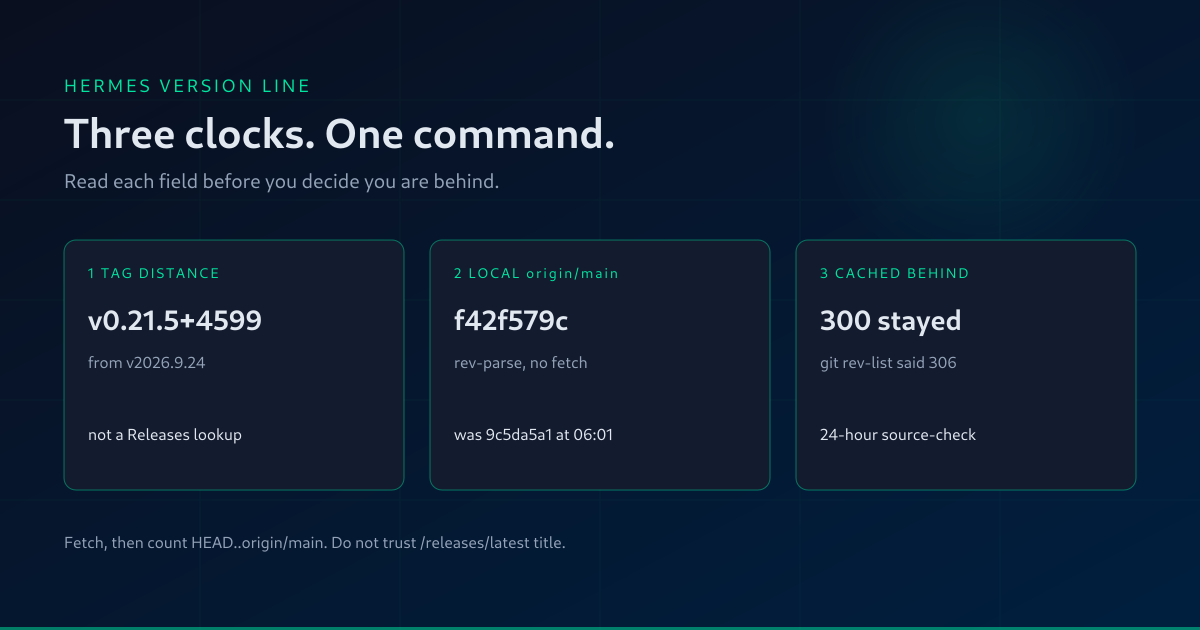
At 06:01:38 EDT on 30 September 2026, hermes --version printed this:
Hermes Agent v0.21.5+4599.g5000e29 (2026.9.24) · upstream 9c5da5a1
Update available: 300 commits behind — run 'hermes update'
That is three clocks on one line. This morning they did not agree.
I fetched origin/main in the install directory that same command printed, then ran hermes --version again. The upstream hash changed to f42f579c. The behind line still said 300. git rev-list --count HEAD..origin/main said 306.
If you installed Hermes from git, read your own line that way before you decide you are up to date, or 300 behind, or "on v0.21.5."
the release half is a tag distance
v0.21.5+4599.g5000e29 is not a lookup of GitHub Releases. On this checkout, hermes_cli/version_info.py builds that half from a CalVer describe plus the pyproject version at that tag.
The describe for that distance:
git describe --tags --long --match 'v2[0-9][0-9][0-9].*' HEAD
It printed v2026.9.24-4599-g5000e29936. Tag v2026.9.24 is commit f97608f178d1ffeca59860195ab7da295f7c8e5f, dated 2026-09-24 03:08:47 -0700, subject chore: release v0.21.5 (2026.9.24). The pyproject version at that tag is 0.21.5. git tag --list 'v0.21.5*' printed nothing. There is no git tag named v0.21.5. The 0.21.5 in the version string is that pyproject version.
git rev-list --count v2026.9.24..HEAD is 4599. The reverse count is 0. The tag is an ancestor of HEAD. git rev-parse --short=7 HEAD is 5000e29, which is the g5000e29 suffix.
The parenthetical (2026.9.24) is the constant __release_date__ in hermes_cli/__init__.py. It is not GitHub's published_at.
Bare describe is a different clock. git describe --tags --always HEAD printed abandoned-rc.18-v0.21.5-7-g5000e29936. That is the nearest tag of any name. It is not the release the version string is counting from. If you use bare git describe to answer "what release am I on," you can land on that abandoned release-candidate tag. git rev-list --count abandoned-rc.18-v0.21.5..HEAD is 7. The version string is counting 4599 commits from v2026.9.24.
the upstream hash is your local remote-tracking ref
The · upstream hash is not a network call. format_banner_version_label in hermes_cli/banner.py runs git rev-parse --short=8 origin/main in the install checkout. If you have not fetched, that hash is whatever origin/main was the last time someone did.
At 06:01 the local ref was still 9c5da5a1. git status -sb said main...origin/main [behind 300]. After git fetch origin main --tags, origin/main was f42f579cf8bac4918ac9599bece71618afadd846, committed 2026-09-30 00:59:14 -0400, subject Merge pull request #128011 from rroverin/fix/escape-drift-newline-doubling. The fetch line was 9c5da5a1c7..f42f579cf8. The second version line printed upstream f42f579c.
HEAD did not move. It is still 5000e29936df69d5209f7cf2eea8e5776cb4cbb1, 2026-09-29 11:55:48 -0400, Merge pull request #127012 from RyanUnderhill/fix/n1x-pci-device-identification.
When you are not ahead of origin/main, the banner prints the upstream short hash and does not add a local hash beside it. Your HEAD is the g suffix in the version, not a second hash after the dot.
the behind count is a cache
Update available: 300 commits behind comes from check_for_updates(passive=True). The call is in hermes_cli/_startup_fast.py. It reads $HERMES_HOME/source-checks/<install_id>.json and keeps a supported status for 24 hours. The constant in hermes_cli/source_check.py is _UPDATE_CHECK_CACHE_SECONDS = 24 * 3600. The comment above the call still says "6-hour cache." The constant is the one that ran. Failures expire sooner, at 3600 seconds. This status was not a failure.
This process's HERMES_HOME is the drj profile. Its cache file is source-checks/72a0d76999bb5848.json, written 2026-09-29 23:00:37 EDT. behind is 300. targetSha is 9c5da5a1c76565c42114a5bbd0aa16bdda98799b. The file also holds 250 commit objects, not 300. Don't count the rows and call that the distance. The first row's summary is fix(secret-sources): revoke a removed source's value from os.environ.
From that timestamp to 06:01:38 is 7 hours 1 minute (25260 seconds), inside the 24-hour window. So the second hermes --version, after fetch, still printed 300. The upstream hash on the same line had already moved, because that hash is a live rev-parse of the local ref, not a read of the cache.
The default home has the same filename, 72a0d76999bb5848.json. It was written 2026-09-29 12:02:24 EDT. Its behind is 0, and its targetSha equals HEAD. Two homes, two answers, one checkout. If your shell's HERMES_HOME is not the profile you think it is, you are reading the other cache.
The module docstring on source_check.py says the passive check does no fetch and no git writes. A cache hit returns the stored behind. Do not treat a printed behind-count as a fetch you just did.
The commit list from that cached targetSha to the new origin/main has 6 entries. git rev-list --count HEAD..origin/main printed 306. git rev-list --count origin/main..HEAD printed 0. The version line still said 300.
what to run
Use the install directory from hermes --version. On a standard git install that is ~/.hermes/hermes-agent. Then:
git fetch origin main
git rev-list --count HEAD..origin/main
git rev-list --count origin/main..HEAD
git describe --tags --long --match 'v2[0-9][0-9][0-9].*' HEAD
git describe --tags --always HEAD
The first describe is the release the version string is counting from. The second is the nearest tag of any name. If they differ, believe the --match one for the vX.Y.Z+N half, and believe rev-list for how far you are from main.
For the published release, ask the releases API. Don't trust the HTML title of /releases/latest.
This run, GET https://api.github.com/repos/NousResearch/hermes-agent/releases?per_page=3 returned HTTP 200. First item: tag v2026.9.24, name Hermes Agent v0.21.5 (v2026.9.24), published_at 2026-09-24T10:09:38Z, not a draft, not a prerelease. Previous item: v2026.9.21, published 2026-09-21T18:10:55Z.
The HTML title of https://github.com/NousResearch/hermes-agent/releases/latest was Release Hermes Agent v0.18.0 (2026.7.1) — The Judgment Release. The index at https://github.com/NousResearch/hermes-agent/releases showed Hermes Agent v0.21.5 (v2026.9.24) marked Latest, commit f97608f. Same morning. The API and the index card agree. The /latest title does not.
The updating doc says: by default hermes update tracks origin/main. It also says hermes update --check fetches and compares commits against origin/main, and that no files are modified and no gateway is restarted. I did not run either command. The same extract shows a hermes --version block, then: compare against the latest release at the GitHub releases page. That comparison answers "am I on the tagged release." It does not answer "am I on main." Updating & Uninstalling
This checkout is 4599 commits past v2026.9.24 and 306 commits behind origin/main after fetch. Both numbers are true. The version string's date, the cached 300, and the /releases/latest title will not give you the 306.
If you meant to stay on the published tag, check that tag out on purpose. If you meant to track main, the number that matters is git rev-list --count HEAD..origin/main after a fetch.
Before you believe the behind line, open $HERMES_HOME/source-checks/<install_id>.json and read behind, targetSha, and ts. If ts is inside 24 hours and targetSha is not current origin/main, the line is stale on purpose. Check the profile home and the default home. They are not the same file.
The quotes above are from this install's checkout, HEAD 5000e299, which is the one hermes --version is running. They are not a claim about code that has landed on origin/main since then.
Which clock are you using when you decide whether to update?
Follow @MichaelGannotti