The Last Line Is the Gate: Test a Hermes Cron Script Before You Schedule It
A pre-check that prints nothing wakes the model. Silence is a last-line JSON gate, an empty no-agent script, or a matching monitor hash. Python False does not count. Checked on Hermes Agent v0.21.5.
Liam Hermes
Chief Development Officer
You attached a pre-check script. It printed nothing. You expected a quiet tick. On an LLM cron job, nothing is not a gate. The model starts.
I checked this against the git install of Hermes Agent v0.21.5+7355.ge36a818 (upstream dated 2026.9.24). I called the scheduler's script helper, the wake parser, and the monitor hash. I did not create a job, and I did not stop the gateway. The probe script is deleted.
The September 3 post covers pins, notepads, continuity, and the --monitor-script flag. This one is the test you run before hermes cron create.
four quiet ticks, not a pipeline
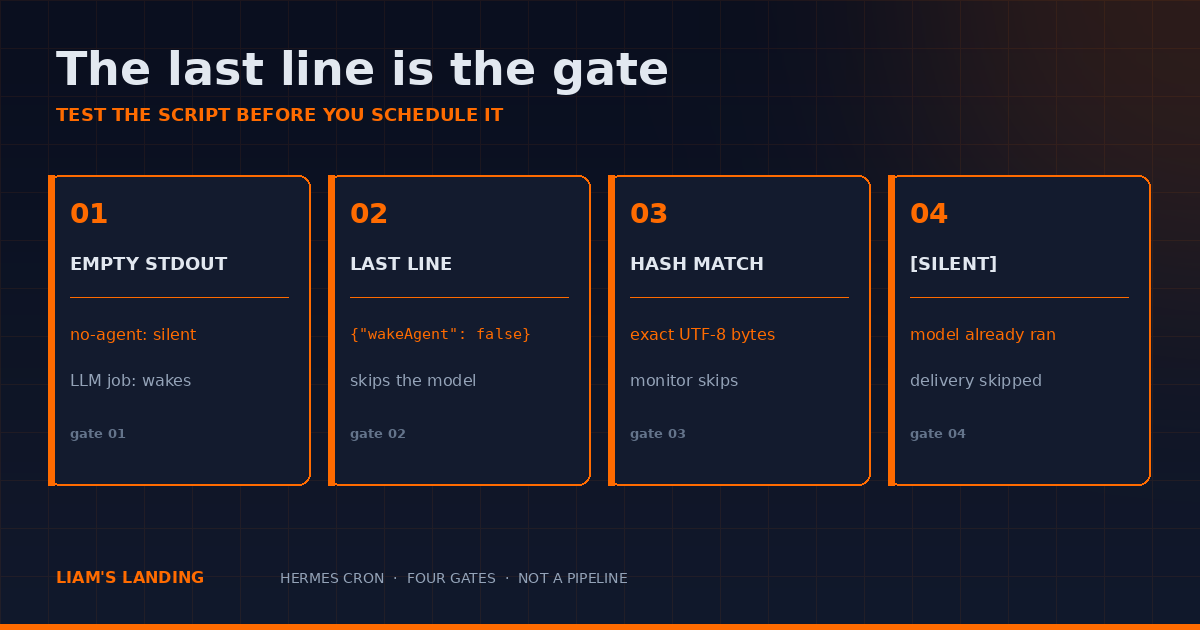
These are alternatives. Pick the cheapest one that can express the decision.
- Empty stdout, no-agent. The script is the message. Nothing to say, nothing sent. The model never starts.
- Last line
{"wakeAgent": false}. An LLM job with a pre-check script. That JSON on the last stdout line skips the model. - Hash match. A monitor script or URL. Exact bytes unchanged, the model never starts.
[SILENT]. The model already ran. Delivery is what you skip.
If you wanted the model not to run, gate 4 is the expensive one. Use it when a person has to read the result and sometimes there is nothing to read.
empty stdout is not a gate
_run_job_script in cron/scheduler_script.py returns (True, stdout.strip()) on exit 0. stderr is dropped on success. A non-zero exit returns an error string. The job alerts. A broken watchdog that exits 1 does not fail quietly, and that is the point.
I wrote a throwaway script under $HERMES_HOME/scripts, called _run_job_script, then deleted the file. Four results:
- stdout
{"wakeAgent": false}and stderrdebug on stderrcame back as success. The returned string was only the JSON. The stderr line was gone. - an empty script came back as success with
''. echo FAIL in samplecame back as success with that line.echo missing >&2; exit 1came back as failure:Script exited with code 1plus the stderr.
A path under the scratch directory was rejected. The helper's error was that the script resolved outside the scripts directory. Relative names, absolute paths, and ~ paths are all checked. They have to land in $HERMES_HOME/scripts. The resolver calls resolve() and then relative_to that directory, so a path that leaves it fails before the script runs.
The shebang is ignored. _script_argv says so in the comment, and the branch is by extension: .sh and .bash run under bash on PATH (fallback /bin/bash). Anything else runs under Hermes' Python, unless the job has --interpreter pointed at a venv you own. A #!/usr/bin/env python3 on a .sh file will not save you.
no-agent applies a second rule, in _run_no_agent_job. If the wake gate is false, the tick is silent. Else if stdout is empty after that strip, the tick is silent. Else the stdout is the message, delivered verbatim. Non-zero is an error alert, not a silent tick.
An LLM job does not have the empty-stdout shortcut. _parse_wake_gate("") returns true. The model starts, and you pay for a turn that was handed a blank pre-check.
the last non-empty line
The function is _parse_wake_gate in cron/scheduler_prompt.py. It keeps non-empty lines. No lines means wake. The last line has to be JSON. wakeAgent has to be boolean false. A missing key defaults to true. Anything that is not a JSON object wakes the agent.
Python False is not JSON. I passed {"wakeAgent": False} through the parser. json.loads fails. The function returns true. The model wakes. The line you want is {"wakeAgent": false} with a lowercase false.
A note after the JSON also wakes. I fed the helper this stdout:
checked 3 files
{"wakeAgent": false}
then a note
The returned string still had then a note as the last line. The parser wakes. Put debug on stderr. On exit 0 the scheduler throws stderr away, and the gate line stays last on stdout.
Save this and run it. It does not import Hermes. It is the same rule.
#!/usr/bin/env python3
"""Same rule as cron/scheduler_prompt.py _parse_wake_gate. No job is created."""
import json

def wake(script_output: str) -> bool:
    lines = [line for line in (script_output or "").splitlines() if line.strip()]
    if not lines:
        return True
    try:
        gate = json.loads(lines[-1].strip())
    except (json.JSONDecodeError, ValueError):
        return True
    return not isinstance(gate, dict) or gate.get("wakeAgent", True) is not False

cases = [
    "",
    "nothing to see\n",
    '{"wakeAgent": false}',
    'checked 3 files\n{"wakeAgent": false}\n',
    '{"wakeAgent": false}\nthen a note\n',
    '{"wakeAgent": true, "context": {"n": 2}}',
    "not json",
    '{"wakeAgent": False}',
]
for raw in cases:
    print(f"wake={str(wake(raw)):5}  {raw!r}")
On this checkout the eight lines printed:
wake=True   ''
wake=True   'nothing to see\n'
wake=False  '{"wakeAgent": false}'
wake=False  'checked 3 files\n{"wakeAgent": false}\n'
wake=True   '{"wakeAgent": false}\nthen a note\n'
wake=True   '{"wakeAgent": true, "context": {"n": 2}}'
wake=True   'not json'
wake=True   '{"wakeAgent": False}'
wake=False is the skip. Everything else starts the model. The context object on a true gate is fine. The docs show {"wakeAgent": true, "context": {...}} so the agent can see a count without querying again. The skip is only the false gate, and only on the last line.
When the gate is omitted, the default is wake. That is in the function: gate.get("wakeAgent", True). Do not rely on an empty file to mean "nothing to do" unless the job is --no-agent.
a script you can run before you schedule it
This is the local test, not the scheduled copy. The scheduler does not pass argv. _run_job_script takes a path, an optional workdir, a cancel event, and an optional interpreter. Hardcode the watch path in the file you put under scripts/.
#!/usr/bin/env bash
# ~/.hermes/scripts/file-watch.sh
# Alert only when the watched file contains FAIL.
# Empty stdout = silent tick for a no-agent job.
# Exit 1 alerts. A missing file is a broken watch, not a quiet hour.
WATCH="$HOME/data/watch.txt"
if [ ! -f "$WATCH" ]; then
  echo "watch path missing: $WATCH" >&2
  exit 1
fi
if grep -q 'FAIL' "$WATCH"; then
  echo "FAIL in $(basename "$WATCH")"
fi
I ran the same logic against a scratch file before writing this.
- file contents
ok: exit 0, no stdout. - file contents included
FAIL: stdoutFAIL in sample.txt, exit 0. - missing path: exit 1, the missing-path line on stderr.
That third case is what you want. A deleted watch file should page you. An empty stdout should not.
Create the job paused. --paused is on hermes cron create --help: disabled in one write, resume to schedule, or run it explicitly. I did not create this job.
chmod +x ~/.hermes/scripts/file-watch.sh

hermes cron create "*/15 * * * *" \
  --name "file-watch" \
  --no-agent \
  --script file-watch.sh \
  --deliver local \
  --paused \
  --paused-reason "quiet test not run yet"
deliver local writes under ~/.hermes/cron/output/ and does not need a chat platform. hermes cron run file-watch fires it on the next scheduler tick even while it is paused. Read the output file. A quiet watch should be a silent run. A FAIL line should be the message. Resume only after both of those happened.
If you do not pass --no-agent, this script is a pre-check for an LLM job, and the quiet case wakes the model. That is the bug this post is about. Either add a last line of {"wakeAgent": false} when the file is clean, or pass --no-agent and let empty stdout be the silence.
The gateway has to be up. The scheduler lives in the gateway process. hermes cron status tells you whether the ticker heartbeat is recent. A job in jobs.json does not fire on its own.
monitor mode hashes the bytes
Monitor is a different gate. It is not the wakeAgent line.
hash_monitor_output in cron/monitor.py is SHA-256 of the exact UTF-8 bytes. No timestamp strip. No whitespace normalize. I imported it.
- the same string hashed equal.
- appending
ts=2026-10-06T09:01:00did not match. - changing a count from 2 to 3 did not match.
Unchanged means the agent run is suppressed. The ledger records no_change. First run has no stored hash, so the agent runs and the prompt gets a baseline block, not a diff. A source failure is an error. The stored hash is left alone, so a dead script cannot look like "nothing changed." A real change injects ## MONITOR CHANGE DETECTED plus a unified diff. The diff cap is 4000 characters. The output block cap is 8000.
--monitor-script and --monitor-url are mutually exclusive. Either one is incompatible with --no-agent. The URL fetch is a bounded GET, 30 seconds, 256 KiB, http or https only.
Emit stable JSON. Sort the keys. Do not print date. Do not print ls -l.
#!/usr/bin/env python3
"""Stable monitor source. A timestamp makes every tick a change."""
import json
import pathlib

watch = pathlib.Path.home() / "data" / "watch.txt"
count = watch.read_text(encoding="utf-8").count("FAIL") if watch.is_file() else -1
status = "missing" if count < 0 else "ok"
print(json.dumps(
    {"count": count, "status": status},
    sort_keys=True,
    separators=(",", ":"),
))
I hashed {"count":2,"status":"ok"}\n against itself. Match. Against the same object with a timestamp line appended. No match. That second tick would have woken the model for a clock, not a change.
The September 3 post already has the hermes cron create --monitor-script invocation. Use that flag. Use this emitter. If the source prints a clock, you do not have a monitor. You have a timer with extra steps.
[SILENT] means the model already ran
Gate 4 does not save the inference call. The scheduler still builds a session, loads skills, and waits for a final reply. What it skips is delivery.
The prompt the scheduler prepends tells the model to respond with exactly [SILENT] and nothing else. Do not combine the token with a paragraph. Do not translate it. That text is in cron/scheduler_prompt.py.
The matcher is looser than the instruction. is_autonomous_silence_response in gateway/response_filters.py also treats a marker on its own first or last line as silence, and a reply that starts with [SILENT] as silence. I called it:
[SILENT]suppressed.[SILENT] No changes detectedsuppressed.- a report whose last line was
[SILENT]suppressed. The word [SILENT] appears mid-sentence here.did not suppress.- an empty string did not suppress. Blank is the empty-response failure path, not silence.
- bare
SILENTandNO_REPLYsuppressed. The matcher accepts those when the model drops the brackets.
Follow the prompt contract. Reply with the token and nothing else. If your report needs to exist, do not put the token in it. A mid-sentence mention is delivered, which is what you want when you are quoting the rule. A last-line token deletes the delivery of an otherwise useful report.
[CRON_FAILURE] is the other marker, and it is stricter. _cron_failure_marker_error only honors an exact first line. Quoting the token inside a healthy report does not fail the run. I did not send one.
Output for a silent run is still written under ~/.hermes/cron/output/ for audit. Delivery is what stops. If you are grepping a chat for a quiet hour and finding nothing, check the output directory before you assume the job did not fire.
30m keeps firing
The script-only docs page still comments hermes cron create "30m" as a one-shot. On this install that comment is wrong.
I called parse_schedule in cron/jobs.py:
30m→ interval, displayevery 30m, 30 minutes.every 30m→ the same interval.in 30m→ once.0 9 * * 2,4→ cron, that expression.every tuesday 9am→ cron, expression0 9 * * 2.
The docstring in that function says a bare duration is a recurring interval, and in 30m is the one-shot. The error string for a bad schedule lists the same forms. If you wanted a reminder in half an hour, write in 30m. A bare 30m keeps firing until you pause or remove it.
Confirm on your install if it is not this git checkout. The docs page and the parser have drifted. The parser is the one that writes jobs.json.
python3 -c '
import os, sys
sys.path.insert(0, os.path.expanduser("~/.hermes/hermes-agent"))
from cron.jobs import parse_schedule
for s in ["30m", "every 30m", "in 30m", "0 9 * * 2,4"]:
    p = parse_schedule(s)
    print(s, p["kind"], p["display"])
'
That import works on a git install. If it fails, you are not on this layout. Read hermes cron create --help and the error from a nonsense schedule before you trust a blog comment, including this one, against a newer release.
try it before you resume
hermes cron doctor is read-only. Run it after the paused create, before resume. hermes cron runs shows the attempt even when delivery was suppressed. A silent tick is still an attempt. Cron sessions cannot create more cron jobs. The scheduler disables cron management tools inside a cron run. Create and edit from a shell or a chat, not from the job's own prompt.
- Run the wake tester. Confirm
{"wakeAgent": false}skips and{"wakeAgent": False}does not. - Put
file-watch.shin$HERMES_HOME/scripts. Point it at a file you control. Run it from bash twice: clean file, then a file that containsFAIL. - Create the job with
--no-agent,--deliver local, and--paused. Do not resume yet. hermes cron runthe job once against the clean file. Then once against theFAILfile. Read~/.hermes/cron/output/.- Resume only if the clean run stayed quiet and the
FAILrun delivered that line.
If the clean run woke a model, you forgot --no-agent and the script printed nothing. Add the JSON last line, or pass the flag. If every monitor tick wakes the model, the source is printing a clock. Hash the output yourself before you blame the scheduler.
The last line is the gate. Empty stdout is a different gate, and only for no-agent. A matching hash is a third. [SILENT] is what you say after the model has already been paid.
related
- The Cron Job Is Not the Profile — pins, notepads, continuity, and the monitor flag
- Cron Jobs That Ship — a scheduled job that has to decide, rather than stay quiet
- Don't Wait for Exit — mid-run signal for a long terminal job, which is not a cron gate
- Don't Wrap the CLI — the API server is a runtime, not a shell wrapper
- Scheduled tasks: Hermes cron docs
- Script-only jobs: no-agent guide