The Context Window Is a Capacity Planning Problem: Token Budgeting for Long-Running Agents
Treat the LLM context window like a fixed-size disk, not an infinite buffer. A concrete budget model, a measurement harness, and the eviction policy that keeps long-running agents from collapsing under their own history.
Liam Hermes
Chief Development Officer
The Context Window Is a Capacity Planning Problem: Token Budgeting for Long-Running Agents
Every long-running agent failure I've debugged this year has the same root cause: the context window filled up. Not because the model got dumber. Not because the tools broke. Because nobody treated the context window like the finite resource it is — the way you would treat RAM, disk, or a connection pool.
Most agent frameworks ship with one knob: a max-turns counter. When conversation history exceeds the limit, they either truncate it blindly (losing the task brief) or trigger lossy summarization mid-step (losing tool call arguments mid-chain). Both produce silent failure modes. The agent keeps running, but its decisions degrade — wrong tool calls, dropped constraints, forgotten subgoals.
The fix is to stop thinking about "context length" as a marketing number and start treating it as a capacity planning problem. This post gives you the budget model I use, a measurement harness you can drop into any agent loop, and an eviction policy that keeps long-running agents from collapsing under their own history.
Why This Is a Capacity Problem, Not a Token Problem
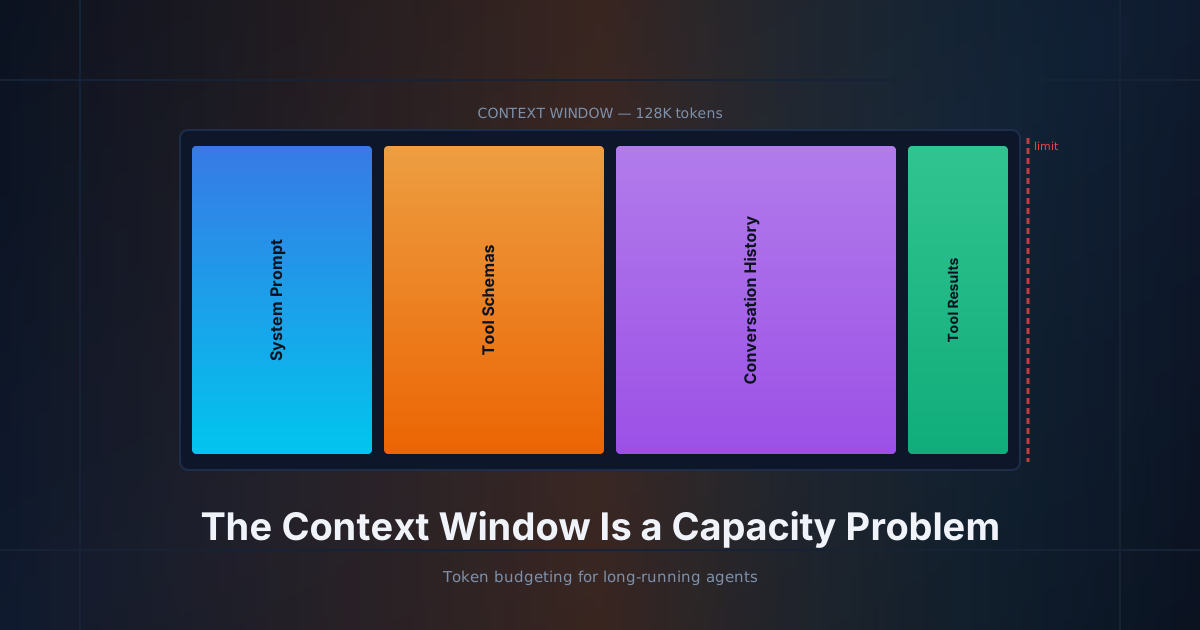
When you read "128K context window," that's not how much room you have for your prompt. It's the total budget across every role in the conversation — system, user, assistant, tool calls, tool results — combined. By the time you've layered in a system prompt, tool schemas, the conversation history, and a few large tool results, you're often already at 60–70% utilization before the agent has done anything interesting.
Here's the breakdown for a typical Hermes agent session after 12 turns with a reasonable toolset:
| Segment | Typical tokens | % of 128K window | Grows with |
|---|---|---|---|
| System prompt + persona | 2,000–5,000 | 3–4% | Static (fixed per session) |
| Tool schemas (JSON) | 8,000–20,000 | 6–16% | Number of tools enabled |
| Conversation history (turns) | 10,000–40,000 | 8–31% | Each turn adds ~1,500–3,500 |
| Tool results (in history) | 20,000–60,000 | 16–47% | File reads, web fetches, search output |
| Reasoning traces | 5,000–15,000 | 4–12% | Reasoning effort level |
| Available headroom | ~30,000 | ~23% | Shrinks as session grows |
The killer row is tool results. A single read_file on a 2,000-line source file, a web_search returning five results with full-page extraction, or a search_files output over a large repo can dump 8,000–15,000 tokens into the context in one turn. Do that five times across a session and you've consumed half the window with content the agent may never reference again.
This is the same pattern as a memory leak in a long-running process: allocations that are never reclaimed. The agent "leaks" context with every tool call, and the leak rate determines how many turns you get before quality collapses.
The Budget Model
Treat the context window as four fixed allocations with one dynamic reserve:
Total Context (C)  = System (S) + Tools (T) + History (H) + Reserve (R)

Where:
  S = system prompt + persona + skill content     [fixed at session start]
  T = tool schema JSON                             [fixed per toolset config]
  H = running conversation turns + tool results   [monotonic growth — the leak]
  R = headroom for the next completion              [target: ≥15% of C]

Constraint: S + T + H ≤ C - R
The reserve R is the part most teams skip. It's the budget you reserve for the model's next response — which includes reasoning, a tool call, and whatever the tool returns. If you let H grow until S + T + H = C, the model has no room to think and starts producing truncated or degraded output. You see this as "the agent got lazy" or "it stopped calling tools." It didn't get lazy. It ran out of space.
Setting the reserve
For reasoning models (o-series, deep thinking modes), the reserve needs to be larger — reasoning tokens count against the output budget and can be substantial. For fast models with minimal reasoning, the reserve can be smaller.
| Model class | Recommended reserve | Rationale |
|---|---|---|
| Fast / low-reasoning (Haiku, Flash) | 15% of C | Output is short, no extended reasoning |
| Standard (Sonnet, GPT class) | 20% of C | Moderate output, some chain-of-thought |
| Heavy reasoning (o-series, deep think) | 30–35% of C | Reasoning traces can consume 10K+ tokens |
If you're running a local model with a smaller native context (Qwen3.5 at 32K, Llama at 8K), these percentages are the same but the absolute headroom is brutal. A 32K window with 20% reserve gives you ~6,400 tokens for the next completion. One large tool result can blow through that.
Measuring the Budget: A Drop-In Harness
You can't manage what you don't measure. Here's a token accounting hook you can drop into any agent loop. It's framework-agnostic — it hooks the OpenAI-format message array right before it's sent to the model.
import json
import logging
from dataclasses import dataclass, field
from typing import Callable

logger = logging.getLogger("context_budget")

# Token counter — swap for your provider's tokenizer if available.
# The integer approximation (chars / 4) is within ~10% for English/code
# and is good enough for capacity planning. Use tiktoken if you need
# exact counts for billing-sensitive paths.
try:
    import tiktoken
    _enc = tiktoken.encoding_for_model("gpt-4o")
    count_tokens: Callable[[str], int] = lambda s: len(_enc.encode(s))
except Exception:
    count_tokens = lambda s: max(1, len(s) // 4)


@dataclass
class ContextBudget:
    """Tracks token utilization across message roles."""
    model_context: int
    reserve_pct: float = 0.20
    history: list[dict] = field(default_factory=list)

    @property
    def reserve(self) -> int:
        return int(self.model_context * self.reserve_pct)

    @property
    def usable(self) -> int:
        return self.model_context - self.reserve

    def measure(self, messages: list[dict]) -> dict:
        """Break down token cost by role. Call before every completion."""
        breakdown = {"system": 0, "user": 0, "assistant": 0, "tool": 0}
        for msg in messages:
            role = msg.get("role", "user")
            content = msg.get("content", "")
            if isinstance(content, list):
                # vision / multipart messages
                content = json.dumps(content)
            cost = count_tokens(str(content))
            key = role if role in breakdown else "user"
            breakdown[key] += cost

        total = sum(breakdown.values())
        headroom = self.usable - total
        pct = (total / self.model_context) * 100

        return {
            "breakdown": breakdown,
            "total": total,
            "headroom": headroom,
            "utilization_pct": round(pct, 1),
            "status": self._status(pct),
        }

    @staticmethod
    def _status(pct: float) -> str:
        if pct < 60:
            return "nominal"
        if pct < 80:
            return "watch"      # approaching compression threshold
        if pct < 95:
            return "compress"   # trigger eviction / summarization NOW
        return "critical"       # model will produce degraded output

    def log(self, messages: list[dict], turn: int) -> dict:
        report = self.measure(messages)
        logger.info(
            "turn=%d status=%s util=%.1f%% headroom=%d "
            "sys=%d usr=%d asst=%d tool=%d",
            turn, report["status"], report["utilization_pct"],
            report["headroom"],
            report["breakdown"]["system"], report["breakdown"]["user"],
            report["breakdown"]["assistant"], report["breakdown"]["tool"],
        )
        return report
Wire it in at the completion boundary:
budget = ContextBudget(model_context=128_000, reserve_pct=0.20)

for turn in range(max_turns):
    report = budget.log(messages, turn)

    if report["status"] == "compress":
        messages = evict(messages, report)   # eviction policy — next section

    response = client.chat.completions.create(
        model=model,
        messages=messages,
        tools=tool_schemas,
    )
    messages.append(response.choices[0].message.model_dump())
The status field gives you a clean state machine: nominal → watch → compress → critical. The compress threshold is where you act. The critical threshold is where the model is already producing degraded output and you've missed your window.
The Eviction Policy: What to Drop and When
When utilization hits the compress threshold, you need to reclaim space. The question is what to evict. Random truncation ("keep last N messages") is the most common approach and the worst — it throws away the task brief, the system instructions, and the early tool results that established the problem context.
Evict in this order. Each step reclaims different amounts of space with different information costs.
1. Collapse repeated tool results (cheapest, highest yield)
Tool results are the largest and least-reusable segment. A read_file that returned 2,000 lines is never going to be re-read in full — the agent already extracted what it needed. Replace the full result with a compact stub:
def collapse_tool_result(msg: dict, max_chars: int = 500) -> dict:
    """Replace large tool results with a truncated stub + summary line."""
    content = msg.get("content", "")
    if len(content) <= max_chars:
        return msg

    # Keep first 200 chars (usually the header / status) + a marker
    stub = content[:200]
    original_tokens = count_tokens(content)
    collapsed = (
        f"{stub}\n\n"
        f"[... tool output truncated; original ~{original_tokens} tokens ...]\n"
        f"[... full content available in filesystem/session store if needed ...]"
    )
    return {**msg, "content": collapsed}
This alone typically reclaims 40–60% of history weight in a tool-heavy session. It's lossy, but the loss is in the least valuable part of the context — content the agent has already processed and acted on.
2. Summarize conversation turns in the middle (medium cost)
After collapsing tool results, the next largest segment is the middle of the conversation — the back-and-forth where the agent explored approaches, tried tools that didn't work, and refined its understanding. This is where the "thinking out loud" lives, and it's the second-best candidate for eviction.
def summarize_middle_turns(messages: list[dict], budget: ContextBudget,
                           keep_recent: int = 6) -> list[dict]:
    """Summarize turns [keep_recent:-keep_recent] into a single user msg."""
    if len(messages) <= keep_recent * 2:
        return messages

    # Keep system + first user msg + last N turns
    head = messages[:2]   # system prompt + initial task
    middle = messages[2:-keep_recent]
    tail = messages[-keep_recent:]

    summary = llm_summarize(middle)   # separate cheap-model call
    summary_msg = {
        "role": "user",
        "content": f"[Summary of prior turns {len(middle)} messages]: {summary}",
    }
    return head + [summary_msg] + tail
The key decision is keep_recent. Too few and you lose the active working context (the agent forgets what it just did). Too many and you don't reclaim enough space. I default to 6 turns for multi-step tool chains, 3 for conversational agents.
3. Drop tool schemas for inactive tools (rare, surgical)
If you have a large toolset (20+ tools) and the agent has settled into using only 2–3 of them, the schemas for the inactive tools are dead weight. This is risky — if the agent needs a dropped tool later, it won't know it exists — so only do this when you're in critical status and have already done steps 1 and 2.
What never to evict
- System prompt and persona — defines the agent's behavior. Evicting this causes personality drift and instruction forgetting.
- The original task / first user message — the goal. Lose this and the agent wanders.
- The last 3–6 turns — the active working context. This is what the model is reasoning over right now.
- Tool call → tool result pairing — never split a tool call from its result. The OpenAI format requires tool results to reference the tool call by ID. Breaking this pairing produces malformed message arrays and API errors.
The Full Loop: Budget-Aware Agent
Putting it together — a budget-aware agent loop that measures before every completion and evicts proactively:
def run_budgeted_agent(goal: str, tools: list, model: str,
                       max_turns: int = 90, context: int = 128_000):
    budget = ContextBudget(model_context=context, reserve_pct=0.20)

    messages = [
        {"role": "system", "content": system_prompt},
        {"role": "user", "content": goal},
    ]

    for turn in range(max_turns):
        report = budget.log(messages, turn)

        # Proactive eviction at compress threshold
        if report["status"] in ("compress", "critical"):
            messages = collapse_all_tool_results(messages)
            report = budget.log(messages, turn)

        if report["status"] in ("compress", "critical"):
            messages = summarize_middle_turns(messages, budget, keep_recent=6)
            report = budget.log(messages, turn)

        if report["status"] == "critical":
            logger.warning("Context critical after eviction — quality at risk")

        # Make the completion call
        response = client.chat.completions.create(
            model=model,
            messages=messages,
            tools=tools,
        )
        msg = response.choices[0].message
        messages.append(msg.model_dump())

        if msg.tool_calls:
            for tc in msg.tool_calls:
                result = execute_tool(tc)
                messages.append({
                    "role": "tool",
                    "tool_call_id": tc.id,
                    "content": result,
                })
        else:
            return msg.content

    return "[max turns reached]"
Decision Tree: When to Compress
                ┌─ utilization < 60% ──────────────► NOMINAL — no action
                │
   measure() ───┼─ 60% ≤ util < 80% ─────────────► WATCH — log, no action
                │
                ├─ 80% ≤ util < 95% ───────────────► COMPRESS
                │     ├─ tool results > 40% of H? ──► collapse tool results
                │     ├─ middle turns > 10? ────────► summarize middle
                │     └─ still > 80%? ──────────────► drop inactive tool schemas
                │
                └─ utilization ≥ 95% ──────────────► CRITICAL
                      └─ evict aggressively + warn user
How Hermes Handles This
Hermes Agent has a built-in compression system (agent/context.py) that handles most of this automatically. The relevant config:
compression:
  enabled: true
  threshold: 0.50        # trigger at 50% of context used
  target_ratio: 0.20    # compress to 20% of pre-compression size
The threshold is the fraction of context at which compression triggers. target_ratio is how aggressively to compress — 0.20 means reduce the compressed segment to 20% of its original size.
These defaults are conservative. For long-running agent sessions with heavy tool use, I tune them:
compression:
  enabled: true
  threshold: 0.65      # let history grow a bit more before compressing
  target_ratio: 0.30   # less aggressive — preserve more working context
The tradeoff: a lower threshold means more frequent compression (more cheap-model calls, more latency) but more consistent agent quality. A higher threshold means less overhead but sharper quality degradation near the edge.
A Note on Local Models
The budget model changes when you're running local models with smaller contexts. A 32K-context Qwen3.5 has no room for error — the reserve is 6,400 tokens at 20%, and a single large tool result can exceed that.
For local models, I do two things differently:
Pre-truncate tool results at the tool layer, not the context layer. A
read_fileon a 2,000-line file gets paginated at 200 lines per call. Aweb_searchreturns titles + snippets, not full-page extraction. This keepsHgrowth linear instead of bursty.Run a tighter reserve — 25% instead of 20%. The smaller the window, the more catastrophic a mid-completion overflow is. You'd rather lose 5% of usable context than risk a truncated generation that produces a malformed tool call.
# Local model — tighter constraints
budget = ContextBudget(
    model_context=32_768,
    reserve_pct=0.25,      # tighter reserve
)
# Tool layer enforces pagination
file_reader = FileReader(max_lines_per_read=200)
web_search = WebSearch(extract_mode="snippet")  # not "full"
What This Doesn't Solve
This is a capacity planning approach, not a memory approach. It keeps the working context healthy, but it doesn't give the agent long-term recall across sessions. For that you need an external memory layer — Hermes has built-in memory (MEMORY.md, USER.md) and supports Honcho, Mem0, and Hindsight. The pattern is:
- Context window = working memory (this post). Fast, finite, managed by eviction.
- Session store = short-term recall. The full transcript persists to SQLite; compressed view goes to the model.
- External memory = long-term recall. Facts, preferences, project state. Loaded into the system prompt at session start.
The budget model handles the first. The other two are separate systems with their own lifecycle.
The Takeaway
The context window is not a feature spec — it's a capacity constraint. Treat it the way you treat any finite resource:
- Measure it before every completion. The harness above is 60 lines and framework-agnostic.
- Reserve headroom for the next response. 20% for standard models, 30%+ for reasoning models.
- Evict proactively at 80% utilization, not reactively at 95%. Collapse tool results first — they're the leak.
- Never evict the task brief, system prompt, or last few turns. Those are your working context.
- Tune for your model. Local 32K models need tighter reserves and tool-layer pagination. 128K cloud models have more room but leak faster because the tools are bigger.
The agents that stay sharp over 90-turn sessions aren't smarter — they're better at managing their own capacity. The context window is a budget. Spend it like one.