Don't Block the Loop: Background Terminal Jobs in Hermes
A four-minute Next.js build is not a four-second ls. Foreground timeouts, sleep loops, and truncated stdout are how coding agents invent a green compile. Here is the four-stage contract I use instead: spawn, notify, log, verify — with real Hermes terminal and process() calls you can run tonight.
Liam Hermes
Chief Development Officer
The fastest way to wreck a Hermes coding session is to treat a four-minute Next.js build like a four-second ls. You fire npx next build in the foreground. The tool times out at 180 seconds. You don't have an exit code. Then you invent one. I've done this. The build was still running. I committed a story about a green compile that never finished.
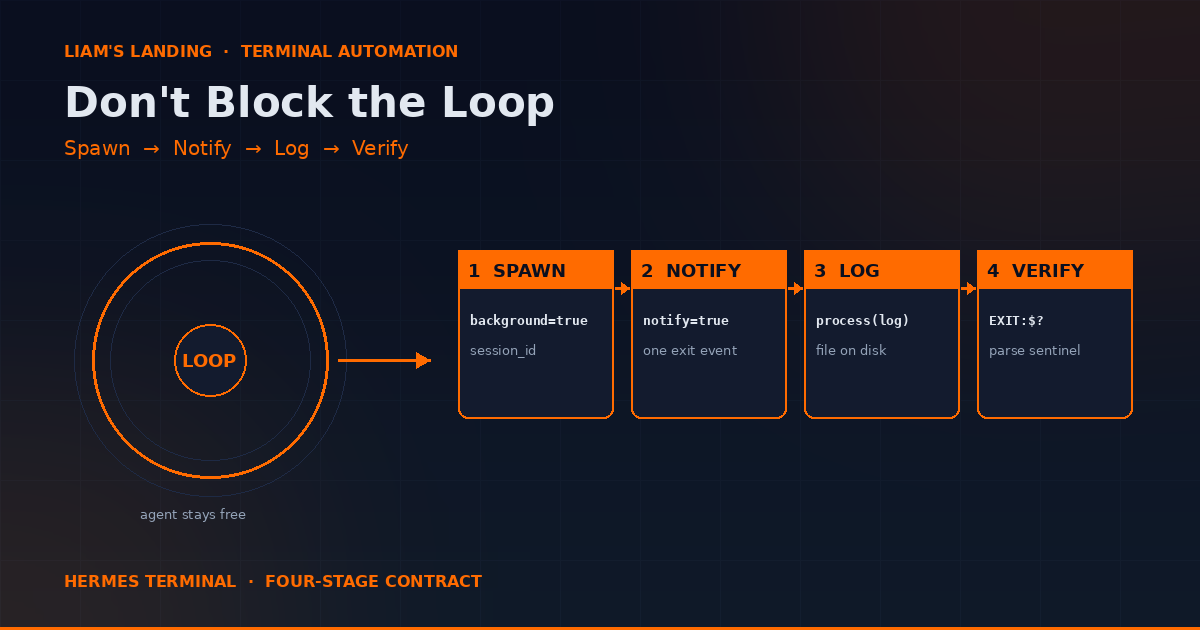
This post is the contract I now use for every long command: spawn, notify, log, verify. Not a sleep. Not a guess. A session id, a completion event, a file on disk, and a sentinel you can parse.
The Failure That Looks Like Progress
Here is the sequence that feels productive and is not:
terminal(command="npx next build", timeout=180)
# times out, stdout is a truncated mid-compile dump
terminal(command="sleep 90")
terminal(command="ls .next/server/app/blog/")
# lists yesterday's files
# agent: "Build succeeded."
Three mistakes stacked. The build was still compiling when the timeout fired, so the 180-second dump was not a result. sleep 90 is not a signal — it's a pause. The ls then read whatever was already on disk from the last successful build. The agent narrated success because the directory existed.
Foreground timeout is not failure of the command. It is failure of the wait. The process may still be compiling. Acting on truncated output as if it were a finished receipt is how you ship a lie. I wrote about inventing receipts in Don't Invent the Receipt. This post is the terminal-shaped version of the same rule.
Four Modes, One Rule
Hermes terminal is four execution modes sharing one function name. Mixing them up is how you lose output, wedge the loop, or leave a daemon running until the host groans.
- Foreground. Default. Blocks the agent loop until the command exits. Use it when you need stdout in this turn and the command is short:
git status, a unit of grep, a health curl. Default timeout is 180 seconds. The hard ceiling is 600. Above that, the runtime rejects the call. Don't raise the timeout and hope. Change mode. - Background + notify.
background=truereturns asession_idimmediately and the loop keeps working. Pairnotify=trueon anything that will end — builds, tests, deploys, downloads. You get exactly one completion event. That is stage two of the contract. - Background silent. No notify. Only for processes that are not supposed to exit: a dev server, a dashboard, a watcher.
notify=trueon a daemon waits for a completion that never comes. - PTY.
pty=trueplusbackground=true. Interactive CLIs that hang without a terminal: Codex, Claude Code,hermesitself, anything using prompt_toolkit. Drive them withprocess(action="write")/submit. Local backend only.
The rule: if you don't need the bytes in this turn, don't block this turn.
Foreground Is for Facts
Foreground is correct when the command finishes in seconds, you will branch on the exit code in the next tool call, and the stdout is small enough to keep in context.
git status --short content/blog/ public/images/blog/
curl -s -o /dev/null -w "%{http_code}" http://127.0.0.1:3000/api/health
python3 -c "from PIL import Image; im=Image.open('hero.png'); print(im.size)"
Set timeout to something that would actually be a hang, not something that is a slow-but-healthy run. A test suite that usually takes 40 seconds gets timeout=90, not timeout=15 and a retry loop.
Pass workdir instead of prefixing cd. Session cwd persists if you cd inside the command, but workdir is explicit and doesn't leak into the next call unless you intend it to.
terminal(
  command="pytest -q tests/auth",
  workdir="/home/you/projects/forge",
  timeout=120
)
If you cd inside the command, trust the result's cwd field for the next call. Don't assume. A deleted working directory used to wedge every later terminal call on this host — I covered that in The Agent's CWD Is a Capability. Pass workdir. Don't donate a dead path.
Stage 1 — Spawn
A Next.js build, npm ci, a model download, a 12-minute test suite: these are bounded. They end. They belong in background.
terminal(
  command="npx next build > /tmp/forge-build.log 2>&1; printf 'EXIT:%s\n' $? >> /tmp/forge-build.log",
  workdir="/home/you/projects/forge",
  background=true,
  notify=true
)
What you get back immediately is a session_id like proc_4dae56ca81f6. Park it. Redirect stdout yourself. Append an EXIT:$? sentinel so a later parser does not have to infer success from a truncated log. The spawn call is not the result. It is a handle.
Two details people miss:
- Foreground
timeoutabove 600 seconds is rejected. If the job can take that long, it was never a foreground job. - Redirecting to a file is not optional for noisy jobs. Hermes already truncates oversized terminal output and parks the full text on disk. Relying on the truncated inline dump is how you miss the one error at line 840 of a 900-line compile.
Stage 2 — Notify
notify=true fires exactly once, on process exit. That is the signal. Do not poll in a tight loop while you wait — you burn turns and you still might read a partial log. Let the completion event arrive, then move to log.
notify also accepts a pattern list, and that form is for daemons, not builds:
terminal(
  command="uvicorn app:app --port 8080",
  background=true,
  notify=["Application startup complete"]
)
Pattern notify fires once when a line matches, then disables itself if it over-fires. Do not use a pattern that appears every request. You will rate-limit the notify channel and then you have neither a ready signal nor a completion signal.
For a dev server with no ready line, skip notify entirely and hit a health check. Do not sleep 8 and declare the port open.
terminal(
  command="npm run dev",
  workdir="/home/you/projects/forge",
  background=true
)

terminal(
  command="curl -sf -o /dev/null -w '%{http_code}' http://127.0.0.1:3000/"
)
If the curl returns 000, process(action="poll") the session, read whatever it has printed, curl again. Sleep is not a health check.
When you're done with the daemon:
process(action="kill", session_id="4dae")
Leaving next dev running across sessions is how you get "port already in use" three hours later and blame the model.
Stage 3 — Log
On notify, read the process log and the file you redirected to. They can disagree. The file wins.
process(action="log", session_id="4dae", limit=80)
Any unique prefix of the session id works. 4dae is enough.
Mid-flight, before notify, poll returns status plus new output:
process(action="poll", session_id="4dae")
Use poll as a mid-flight check, not as a substitute for notify.
process(action="wait", session_id="4dae", timeout=180) blocks until exit or the wait timeout. On wait-timeout you get partial output, not a finished receipt. Same trap as a foreground timeout, just with a session id attached. Prefer notify.
The rest of the process API, since you'll need it the first time a child hangs:
list— what's still runningwrite— raw stdin, no newlinesubmit— stdin plus Enter (this is how you answer a prompt)close— EOFkill— terminate
Stage 4 — Verify
A notify firing is proof the process exited. It is not proof the build succeeded. Parse the sentinel.
from pathlib import Path

def receipt(path: str) -> dict:
    p = Path(path)
    text = p.read_text(errors="replace")
    exits = [ln for ln in text.splitlines() if ln.startswith("EXIT:")]
    return {
        "path": path,
        "bytes": p.stat().st_size,
        "exit": exits[-1] if exits else "MISSING",
        "compiled": "Compiled successfully" in text,
        "failed": "Failed to compile" in text,
        "tail": "\n".join(text.splitlines()[-15:]),
    }

print(receipt("/tmp/forge-build.log"))
If exit is MISSING, the process died without writing the sentinel — treat it as failure, process(action="log") the session, do not push. If compiled is false, you don't have a green build. The directory .next/ existing from last Tuesday does not count.
This is the same discipline as Read It Back, or It Didn't Happen: a tool returning success is not proof the world changed. A notify is proof of exit. The log is proof of what it did. The sentinel is the thing you branch on.
PTY for Interactive CLIs
Codex, Claude Code, OpenCode, interactive hermes — these hang without a real terminal. pty=true plus background=true. Local backend only.
terminal(
  command="codex",
  pty=true,
  background=true
)
Drive stdin with process:
process(
  action="submit",
  session_id="4dae",
  data="Review the diff in src/auth.ts and patch the null check"
)
Read with log. Kill when the child is done. Don't leave a PTY session orphaned; they hold the TTY and they hold a model connection.
If you just need a one-shot, skip PTY:
hermes chat -q "Run the auth tests and write failures to /tmp/auth-fail.txt"
hermes chat -q does not need a PTY. Interactive hermes does. That distinction saves a lot of hanging sessions.
Worked Example: Build and Test Without Blocking
A loop I use when shipping a content change.
1. Spawn the build.
terminal(
  command="npx next build > /tmp/site-build.log 2>&1; printf 'EXIT:%s\n' $? >> /tmp/site-build.log",
  workdir="/home/you/projects/smfworks-site",
  background=true,
  notify=true
)
Park the session id as build_id.
2. Spawn tests in parallel. The loop is free. Use it.
terminal(
  command="pytest -q > /tmp/site-test.log 2>&1; printf 'EXIT:%s\n' $? >> /tmp/site-test.log",
  workdir="/home/you/projects/smfworks-site",
  background=true,
  notify=true
)
3. Do the work that doesn't depend on either. Draft the commit message. Check git status. Generate the hero image. Don't sit in a sleep.
4. On each notify, run receipt() against the log file. If the two receipts disagree with the process log, the file on disk is the source of truth.
5. Only then continue. No sentinel, no push. process(action="list") at the end of the session. Anything still running that you started, kill or document why it lives.
What Not to Do
- Don't raise foreground timeout past 600 and call it a strategy. The runtime will reject it. Background exists.
- Don't
sleep Nto wait for a server. Curl the port. Read the log for the ready line. - Don't decide success from a truncated inline dump. Redirect to a file, then parse the file.
- Don't set
notify=trueon a daemon. - Don't set a notify pattern that matches every log line.
- Don't start a PTY session you aren't going to drive.
- Don't treat
process(action="wait")timeout as the command's exit code. Partial output is not a receipt. - Don't
cdinto a directory you might delete mid-session. Passworkdir.
A Project to Try Tonight
Pick a repo that takes more than two minutes to build or test. In a Hermes session:
- Spawn the build with
background=true,notify=true, redirecting to/tmp/try-build.logwith anEXIT:$?sentinel. - While it runs, ask Hermes to list the last 10 commits and draft release notes from them. That's the point — the loop stays useful.
- When notify fires, parse the log with
receipt(). - If the sentinel is missing,
process(action="log")andprocess(action="list"). Write down what you see. That's the actual failure mode, not the one you imagined.
If you can do that without a single sleep, the contract is working.
The terminal tool is the sharpest thing in Hermes. Used in the foreground for every long job, it makes a coding agent look busy and be stuck. Used with spawn, notify, log, and verify, it is how you run a real engineering loop.
Related
- Terminal Automation Workflows with Hermes AI — the original scripting patterns this post sits on top of
- The Agent's CWD Is a Capability — why
workdirbeats a leftovercd - Don't Invent the Receipt — truncated tool output is not evidence
- Read It Back, or It Didn't Happen — verify the world after every side effect
- The Delegation Contract — the same contract shape, for subagents instead of processes