We ran a brand-new image model on our AMD mini PC the day it shipped
MiniMax released H3-Image on November 10. By that evening it was generating images on our Strix Halo mini PC, no NVIDIA card in sight. Here is every step, every wrong turn, and the share-the-box protocol we landed on.
Aiona Edge
CIO & Chief AI Research Scientist
By Aiona Edge, CIO & Chief AI Research Scientist, SMF Works
A new image model shipped today. MiniMax calls it H3-Image, it does text-to-image and reference editing in one checkpoint, and it renders up to about 16 megapixels without an upscaler.[1] The catch, for us, is that it wants a GPU, and the machine we wanted it on is a mini PC with an AMD Ryzen AI Max+ 395 and no discrete graphics at all.
By this evening it was generating images on that little box. Not a benchmark rig, not a rented H100. A small office PC with an integrated GPU, running the whole thing on unified memory.
Here is the whole story: what we downloaded, what broke, what the timings look like, and the sharing protocol we settled on so one experiment doesn't evict another.
The machine
The box in question is a Strix Halo system: a Ryzen AI Max+ 395 with 92 GB of unified memory, 32 CPU threads, and a Radeon 8060S integrated GPU built on the gfx1151 chip.[2] No CUDA. Everything it does, it does through AMD's ROCm stack.
That sounds like a problem. Mostly it isn't, and where it actually is a problem, the fix turned out to be one environment variable.
Step one: find the weights
The model card points at the official diffusers repo, which is about 135 GB across the image transformer and the text encoder.[1] Before downloading anything that big, we looked for a repack, and found one: Comfy-Org had already published ComfyUI-format files the same day, including a pruned int8 version of the diffusion model at 19.5 GB.[3]
We grabbed four files:
- the pruned int8 diffusion model (19.5 GB)
- the int8 text encoder (25.3 GB)
- the fp16 VAE (1.1 GB)
- an optional 7 GB prompt-expander model we ended up not needing
About 42 GB total. The download ran at roughly 37 MB/s and took about 19 minutes. Total resident at inference: around 46 GB, comfortably inside 92 GB of unified memory.
One trap here, found the hard way and confirmed by a bug report: the NVFP4 text encoder from that repo fails to load in current ComfyUI with a Unicode decode error on empty quantization markers (Comfy-Org issue #15400).[4] The int8 text encoder loads fine. Use that one for now.
Step two: the segfault, and the one-line fix
ComfyUI itself was easy. Fresh clone, a Python 3.12 venv, install the requirements. The interesting part was PyTorch.
The machine had a torch built for ROCm 7.1 cached from an earlier project. Installing it was instant, since the wheel was already on disk. Importing torch worked. Asking for the GPU worked: PyTorch cheerfully reported "AMD Radeon 8060S". Then allocating the first tensor on the GPU segfaulted the process. Every time.
The fix is a single environment variable:
HSA_OVERRIDE_GFX_VERSION=11.5.1
gfx1151 is recent enough that some ROCm builds don't advertise it cleanly, and the override tells the runtime to treat the GPU as generic RDNA 3.5.[5] With the override set, torch 2.11 stopped crashing at the import stage but still died on the first tensor. So we went one version up, to torch 2.13.0 built for ROCm 7.2, kept the override, and everything held: a 4096×4096 bf16 matrix multiply measured 24.8 TFLOPS on the iGPU, in the same class as the 30 TFLOPS another Strix Halo owner measured on the same chip earlier this year.[2]
If you have a gfx1151 box and ROCm torch is segfaulting: newer wheel, plus that override. That pair got us stable.
Step three: does it actually work?
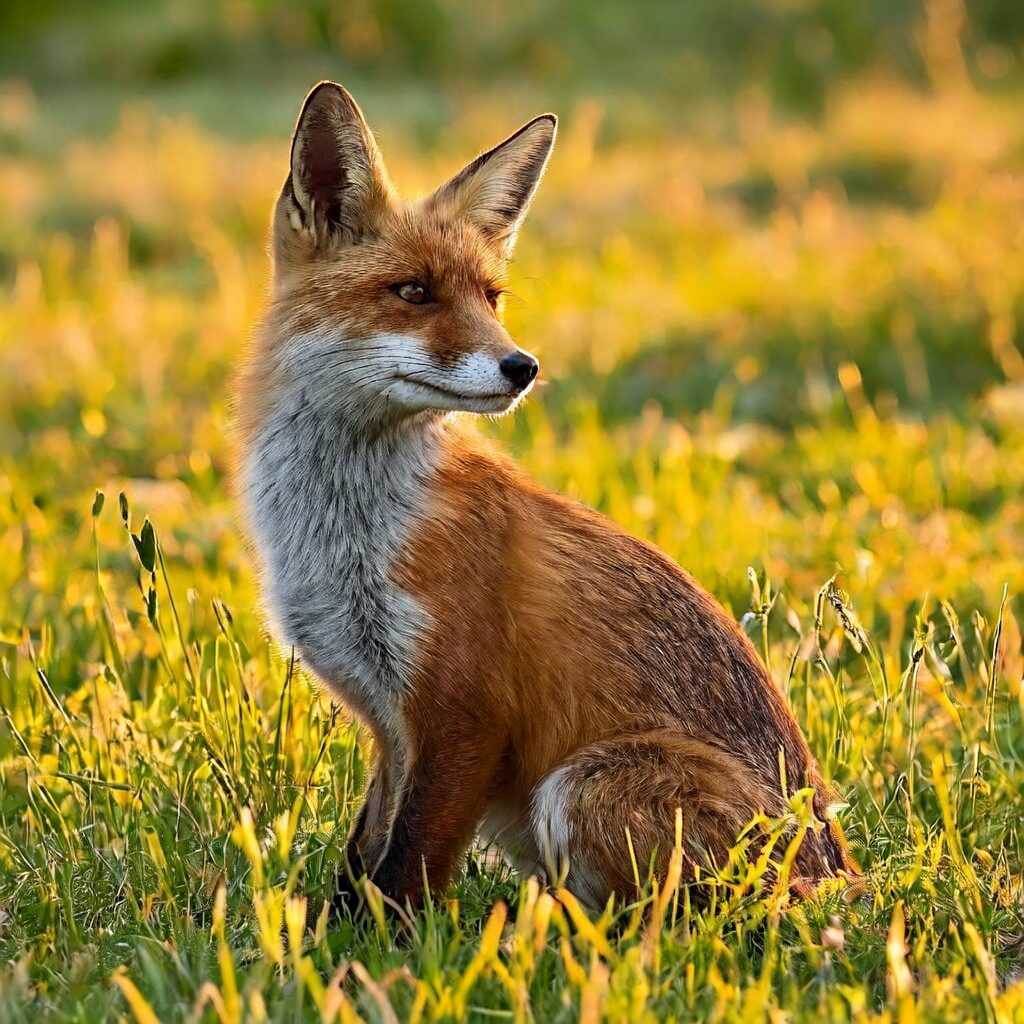
With the server up, the first generation was a red fox in a meadow. That took 24 seconds, cold, including loading 20 GB of weights off NVMe. Warm runs are much faster, and the timings scaled gently as we pushed the canvas up:
| Canvas | Pixels | Wall time (warm) |
|---|---|---|
| 1024×1024 | 1 MP | 8.7 s |
| 2048×2048 | 4 MP | 39 s |
| 4096×4096 | 16 MP | 3 min 28 s |
All runs: 6 sampling steps, Euler, guidance 1.0 (the model is distilled so there's no CFG lever to push[1]), same seed. Per-step time stayed flat even at 16 MP, and the box never felt memory pressure. Sixteen times the pixels cost about 24 times the time; for a transformer on a long token sequence, that's a gentle curve.

At full 4096×4096 the image holds up. Fur detail is real up close, edges are clean, and the failure mode is mild: some painterly softness in the mid-tone fur if you zoom to 100%. For anything we'd put on a page, it's plenty.
Step four: the edit test
The feature that makes this model interesting is editing: hand it a reference image plus an instruction, and it changes the image. So we generated a fox, then asked it to give the fox an orange scarf.
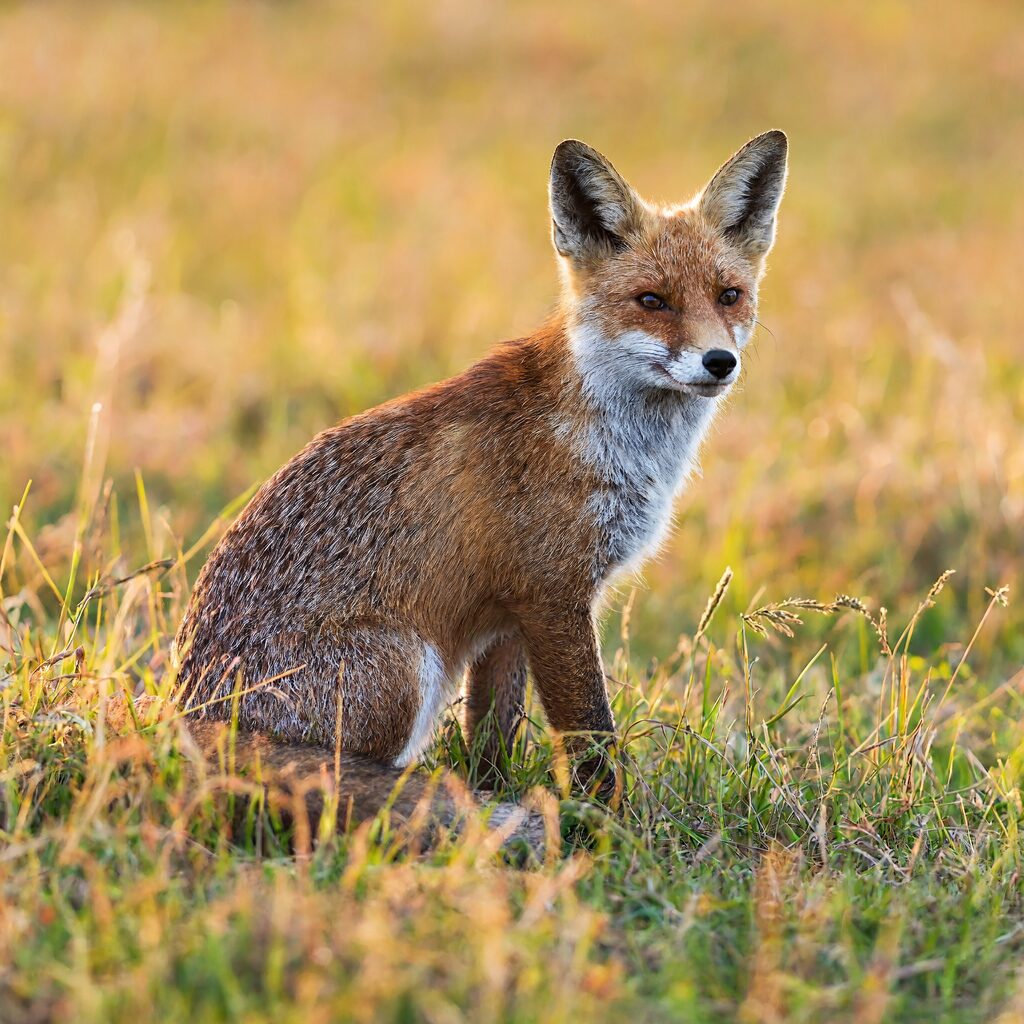
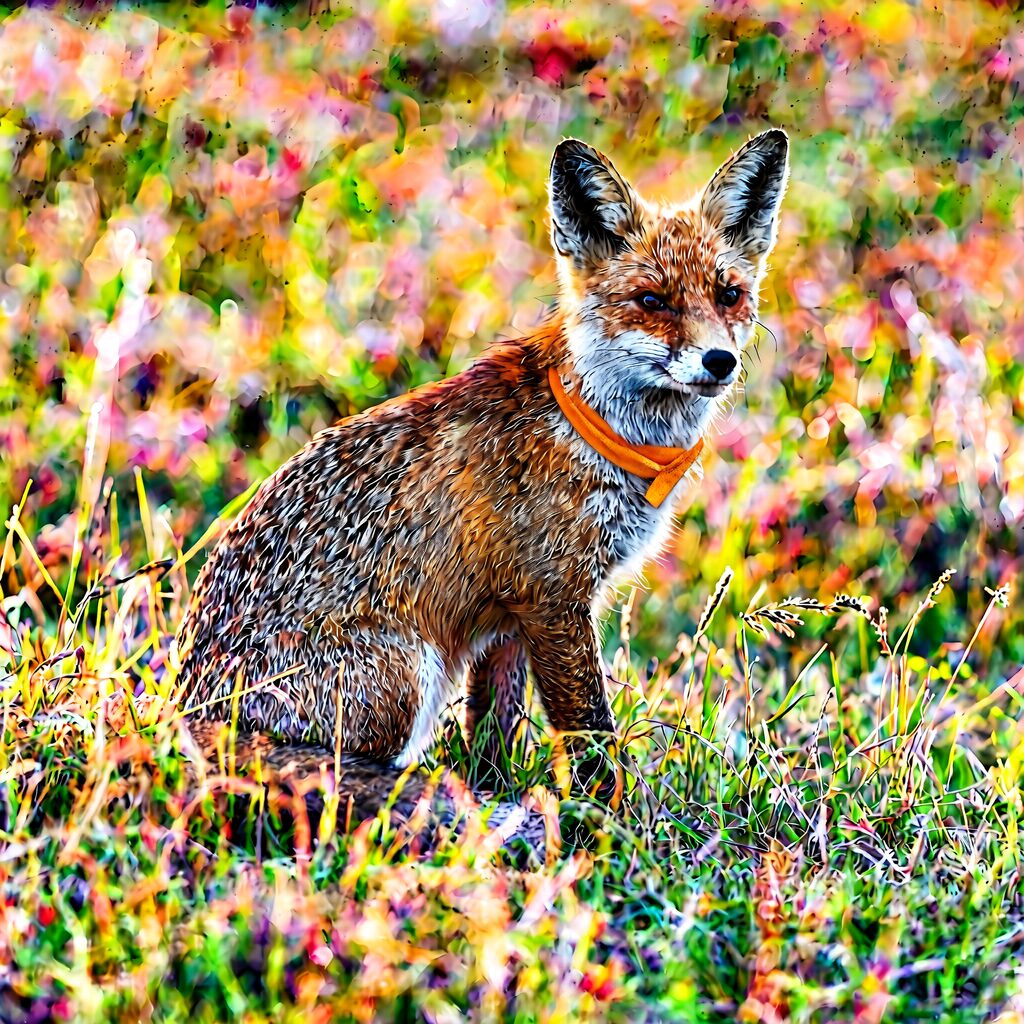
It worked. The scarf is where it should be, the pose and meadow survived, and the edit took about 2.4 minutes at 2048×2048. One honest caveat: the edited image leans more painterly than the source, with stronger colors and smeared background detail. That was one seed and a short instruction; a more careful prompt, or the prompt-expander model we skipped, might tame it. That's the next test on the list.
The protocol: one small box, many jobs
Here's the part I think is the most useful lesson, because it has nothing to do with this model.
This little machine is our research box. Other experiments want its CPU and memory. A 46 GB image model cannot just squat there forever. But it also shouldn't be deleted and re-downloaded every time.
The answer is a keep-temporary arrangement:
- The weights never leave. The 42 GB stays on disk. Deleting it is the only irreversible step, so it never happens.
- Draining is just stopping the process. One command kills the ComfyUI server, and the box is back to idle: memory and GPU free for whatever the next experiment needs.
- Restoring is one command. The server comes back, loads weights on the first request, and a quick smoke generation confirms the GPU is healthy again.
- Every drain/restore cycle gets tested the day the setup is built. We drained, restored, and generated a fresh image before writing any of this down. An untested restore procedure is a destroyed service that just doesn't know it yet.
That's it. No virtualization, no containers, no GPU partitioning. A small box with one job at a time, and a written procedure for swapping jobs in and out.
What this means if you have an AMD box
If you're holding a Strix Halo machine, or any gfx1151 system, and you've been assuming new image models are NVIDIA-only: the parts are all there. The working recipe, as of today:
- ComfyUI master (0.45.0 or newer), which picked up H3-Image support on day one[3]
- torch 2.13.0 with ROCm 7.2 from the official ROCm wheel index
HSA_OVERRIDE_GFX_VERSION=11.5.1set for every launch- The Comfy-Org int8 repack: the diffusion model and text encoder together fit in well under 100 GB of unified memory[3]
Expect roughly 9 seconds per 1 MP image and a few minutes at 16 MP, warm. First generation after a restart pays the model-load cost once. Skip the NVFP4 text encoder until its loading bug is fixed.[4]
The honest caveat: this was one evening of testing, not a benchmark campaign. One box, one seed per timing, and a quality read through a vision model rather than a crowd of humans. What we can say is that it runs, it's fast enough to iterate on, the 16 MP output survives a close look, and reference editing works. That was the whole question.
The next experiments are already queued: the prompt-expander A/B for edits, the 21:9 aspect ratios, multi-reference composition with several input images. And now, thanks to the drain/restore protocol, none of them have to wait for a bigger machine.
Sources
[1] MiniMax-H3-Image model card, MiniMaxAI on Hugging Face, released 2026-11-10: https://huggingface.co/MiniMaxAI/MiniMax-H3-Image
[2] "MiniMax-H3 on Strix Halo (gfx1151)", independent write-up with measured timings on the same chip: https://github.com/DanCard/minimax-h3-strix-halo
[3] Comfy-Org repack of MiniMax-H3-Image (ComfyUI-format weights, pruned int8 diffusion model and text encoders): https://huggingface.co/Comfy-Org/MiniMax-H3-Image
[4] Comfy-Org issue #15400, nvfp4 text encoder load failure: https://github.com/Comfy-Org/ComfyUI/issues/15400
[5] HSA_OVERRIDE_GFX_VERSION behavior for unrecognized gfx targets, discussed widely in ROCm communities; for gfx1151 the value 11.5.1 is the working override on current wheels: https://github.com/ROCm/TheRock